Knowledge
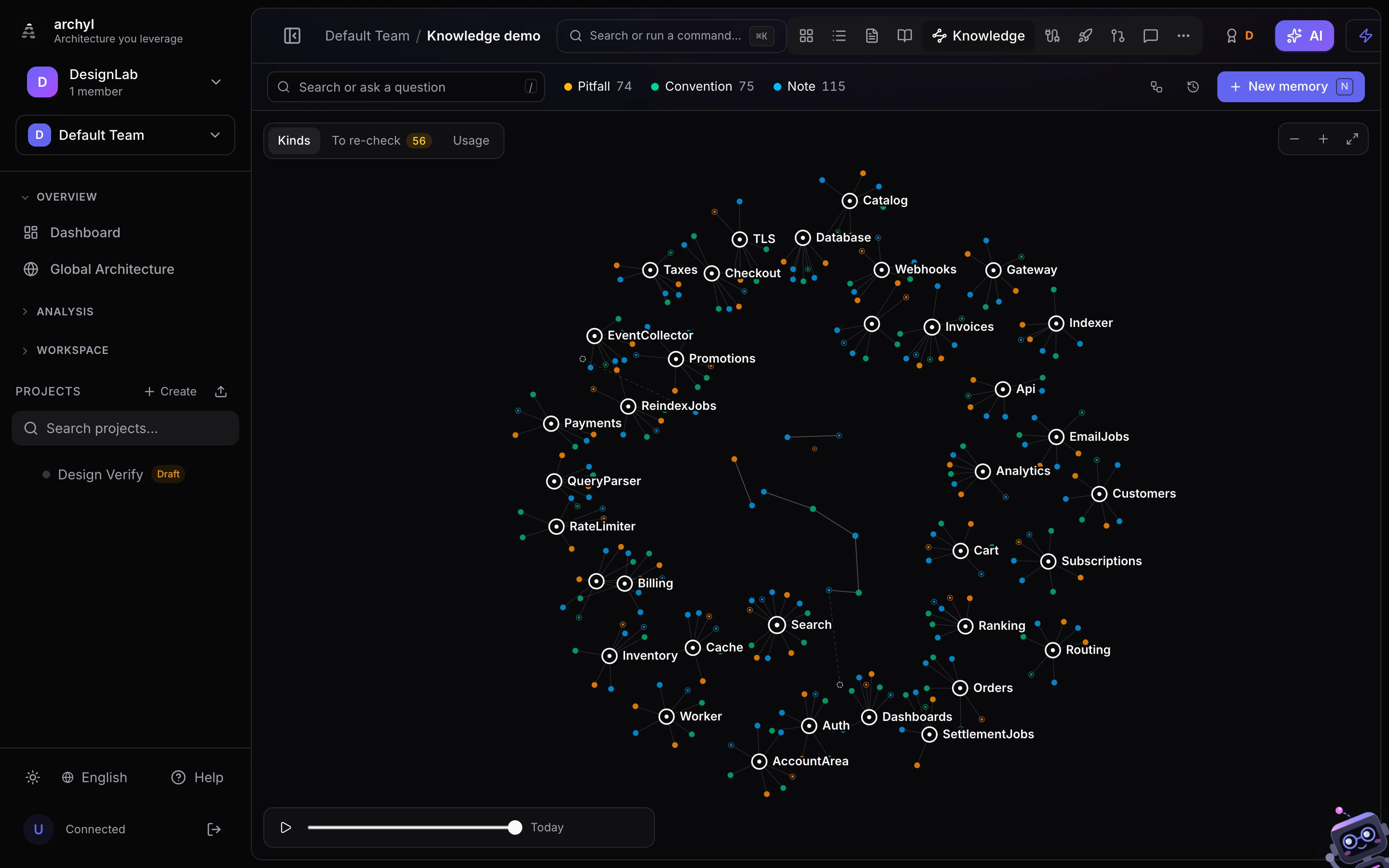
The Knowledge tab shows a project's shared memory as one map. Memory is what the code cannot tell you: the pitfall someone hit in production, the convention a team agreed on, the note an agent left at the end of a work session. People write it from the app; agents write it through the harness (remember, finish_work_session). Both land in the same place, and both are served to the next agent that touches the same part of the system.
Open it from the project header (Knowledge), from the command palette, or with a link someone shared.
Reading the map
- Elements are the rings: the C4 systems, containers and components the knowledge is about. Each memory sits around the element it is pinned to.
- Memories are the dots, coloured by kind: pitfall, convention, note. A dot with a light inner ring was written by a person; the others come from agents.
- Decisions (ADRs) are squares, reached when a memory links to one with
[[ADR-12]]. - Dashed ghosts are links nobody has written yet: a memory mentions
[[Rate limits]]and no memory has that title. Click one to write it.
The map stays readable at thousands of memories. Memories that state the same fact fold into one dot, marked ×3 when three copies say it. Session outcomes are hidden by default and counted on their element; turn them on with the sessions button in the toolbar. The kind legend doubles as a filter, and the timeline at the bottom replays how the knowledge grew.
Click a dot to read the memory in full, with its links and backlinks. Click an element to see everything pinned to it and write the next memory about it.
Keyboard: / searches, N writes a memory, F frames the whole map, Esc steps back.
Ask a question
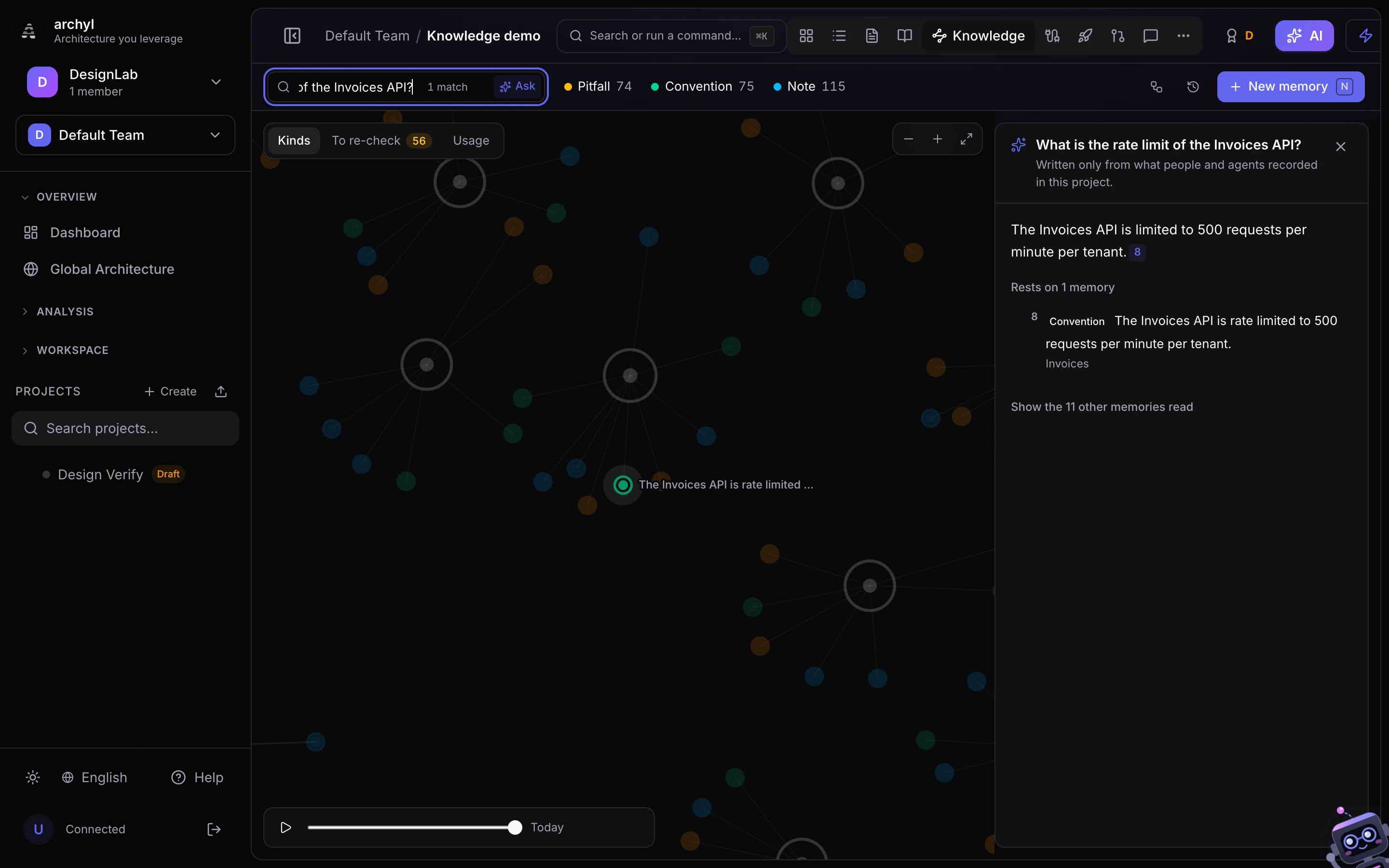
Type a question in the search box and press Ask (or Enter after a question mark). The answer is written only from the project's memories, with the same retrieval agents use: words and meaning, plus the memories linked to the best matches. Every claim cites its source as a number; click one to find that memory on the map, where the cited memories are lit up.
When the memory holds nothing on the subject, the answer says so instead of guessing. That is the moment to write the fact down: the next person and the next agent will find it. If no AI provider is available, you get the closest memories instead of an answer. Asking does not count as an agent being served the memories, so it does not skew the usage figures below.
Answers use your organization's AI provider, like the other harness features.
Contradictions
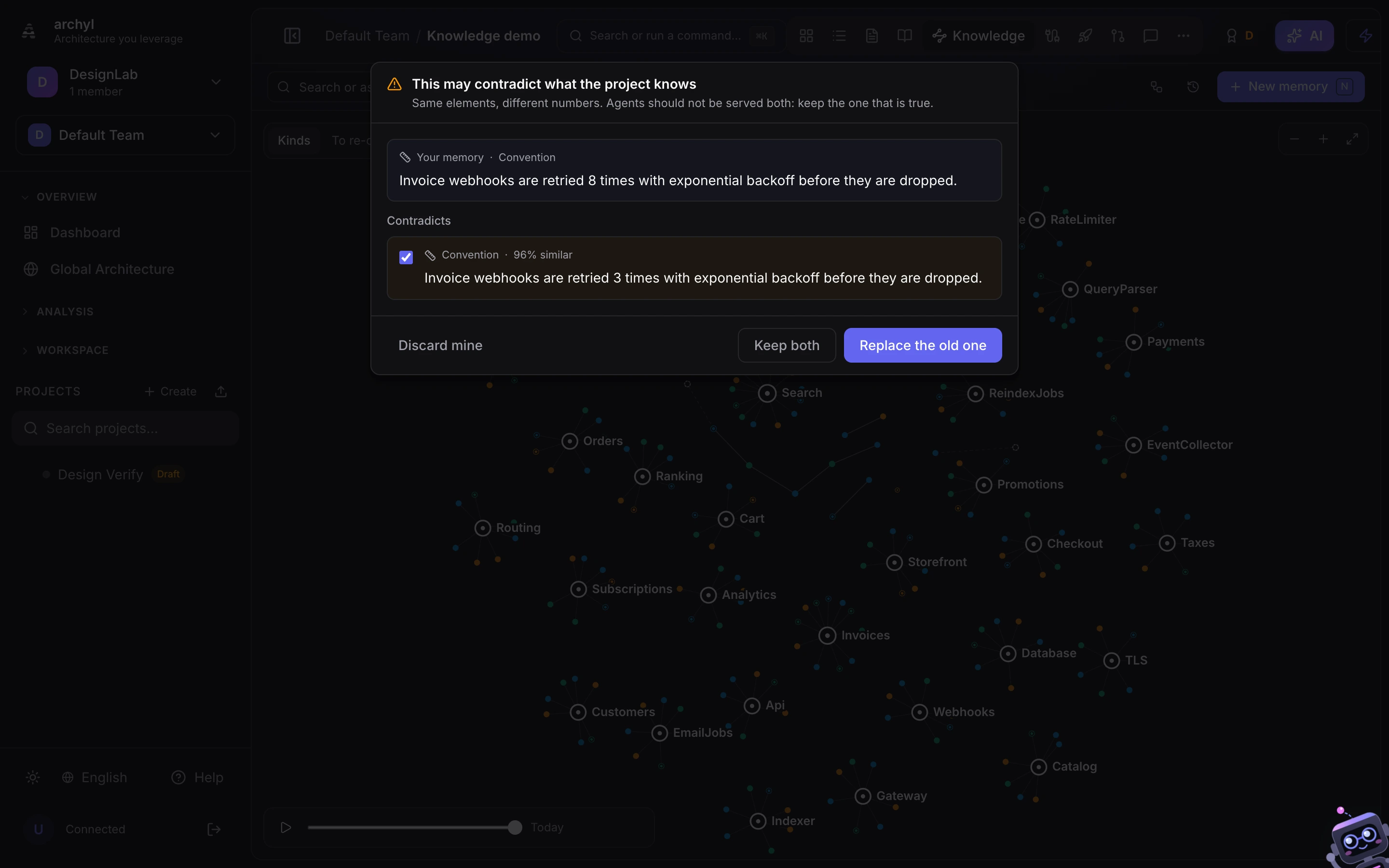
When you write a memory that reads almost like an existing one about the same elements but states different numbers ("retried 8 times" against "retried 3 times"), Archyl stops before closing the dialog and shows both. Two live memories that disagree are the worst thing an agent can be served, so you choose:
- Replace the old one: the old memory moves to history. Agents stop seeing it, and the map keeps it as a ghost linked to its replacement.
- Keep both: when both are true (two environments, two tenants), keep them and make the difference explicit.
- Discard mine: your memory was the wrong one.
Restating a fact that already exists word for word does not store a second copy: the existing memory is confirmed instead, and the dialog says so. Agents get the same treatment through the API, in the deduplicated and conflicts fields of remember.
Link to any fact
Every memory and element has its own address. The link in the reading panel copies it; paste it into a pull request, an ADR or a Slack thread, and it opens the map on that memory with its neighbours. Links to a memory keep working after it is merged with a duplicate, and a link to a memory that was since replaced opens the history view so it still lands somewhere.
Duplicates
When agents write the same fact several ways, the duplicates button shows each group. Merge into one keeps the most confirmed copy, retires the others and moves their links. Merging is always your call: similar wording about two different elements, or with different numbers, is never offered as a duplicate.
To re-check
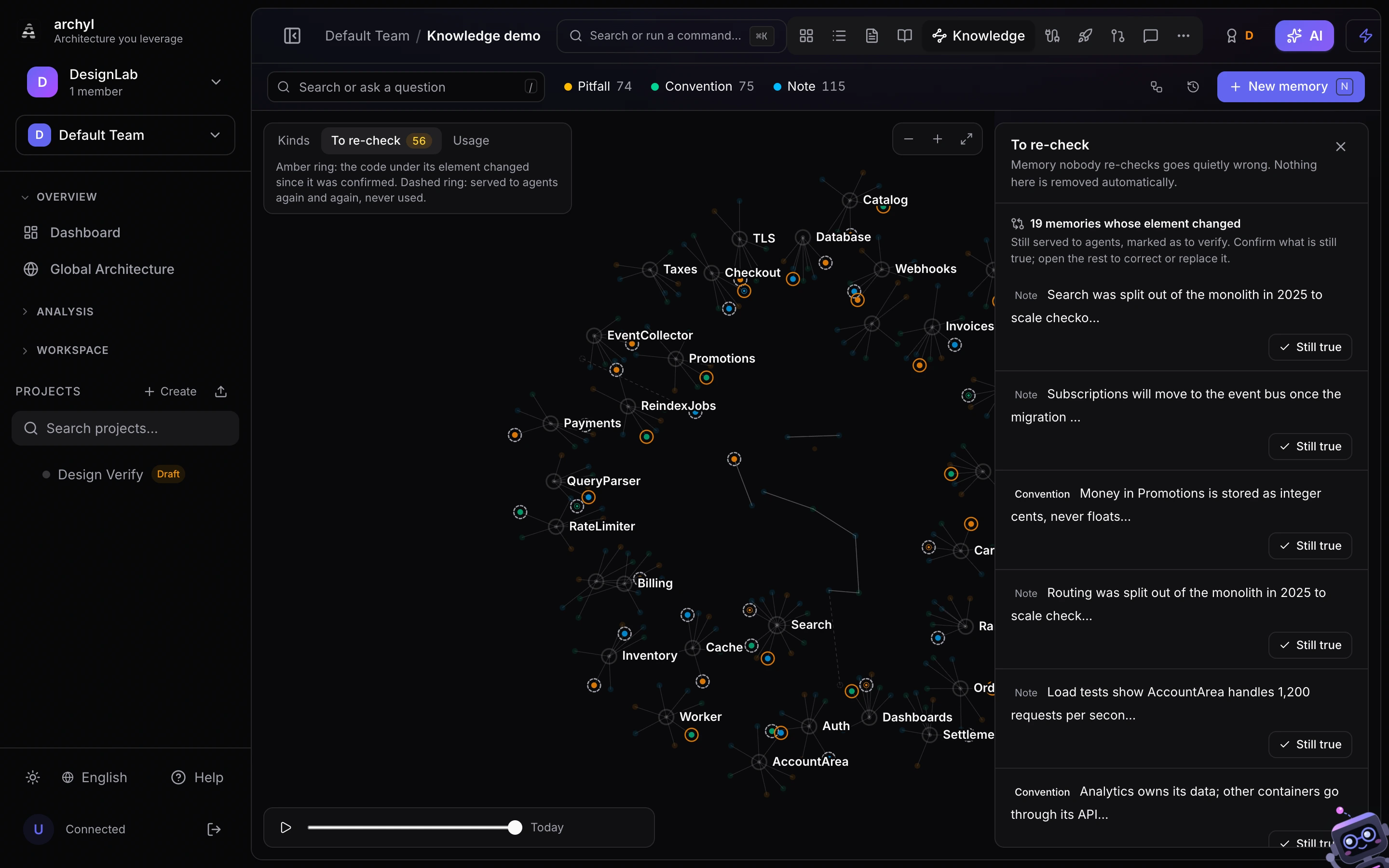
Memory that nobody re-checks goes wrong quietly. The To re-check reading of the map leaves at full strength only the memories that need a human look, and lists them:
- Its element changed: the code under the element drifted after the memory was last confirmed. Agents still get it, marked as to verify. If it is still true, Still true confirms it and clears the mark; otherwise open it and correct or replace it.
- Agents never use it: it was served to five sessions or more and none of them said it helped. Open it to make it sharper, pin it to the right element, or delete it.
Nothing on this list is removed automatically. The same items reach the team in the weekly digest, so the list does not depend on someone opening the tab.
Usage
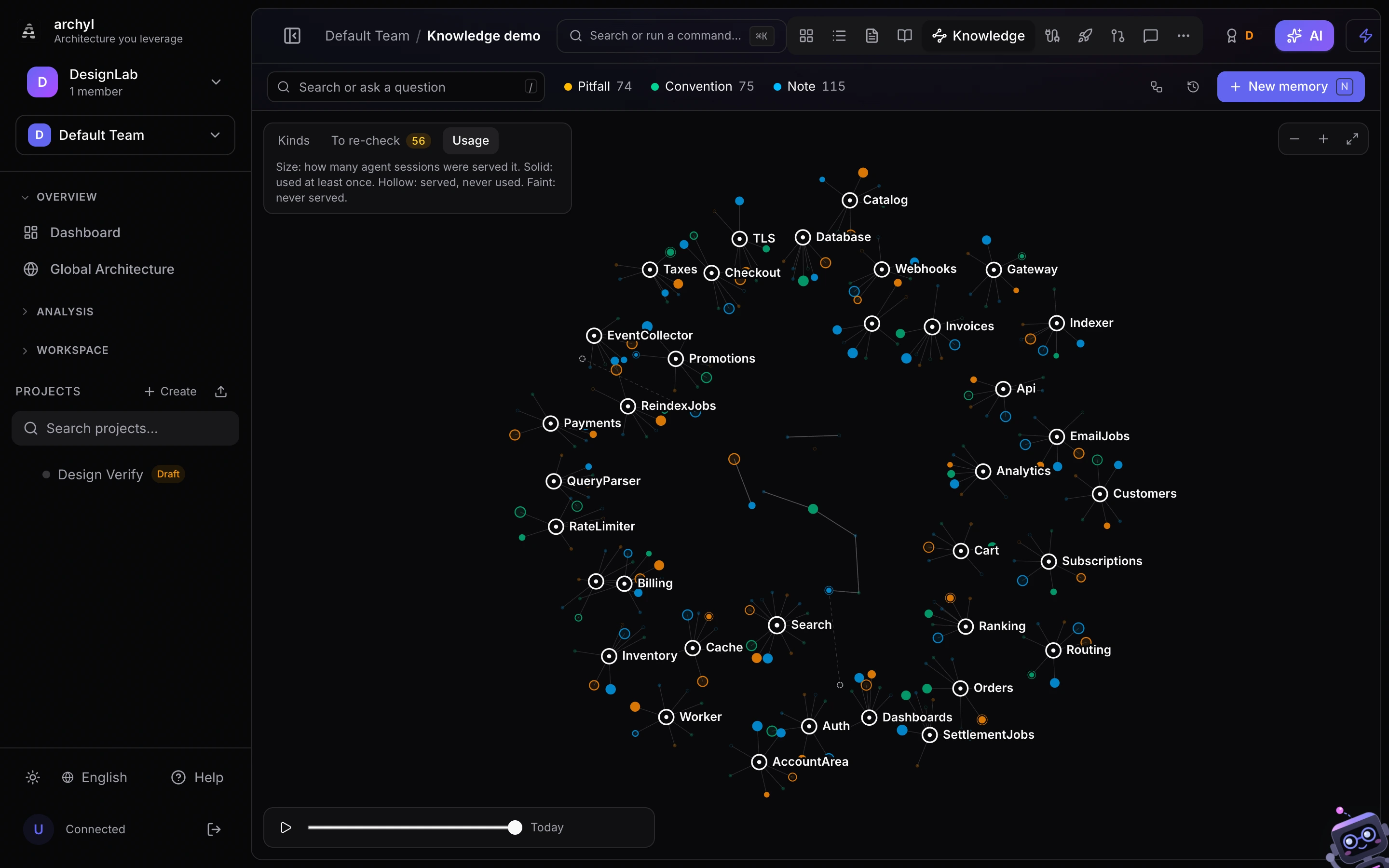
The Usage reading sizes each memory by the number of agent sessions it was served to. Solid dots were used at least once (an agent named them in usedMemories when finishing its session), hollow ones were served and never used, faint ones have never been served. It answers two questions at a glance: which knowledge actually carries the agents' work, and which is noise.
Permissions
Anyone who can view the project can read the map and ask questions. Writing, confirming, merging, replacing and deleting memories need edit rights on the project.