Archyl Harness
Coding agents know your repository perfectly — and your architecture not at all. They rewrite a service another agent is refactoring at the same moment, introduce the dependency your team banned in an ADR two years ago, and leave your documentation describing a system that no longer exists.
The Archyl Harness fixes this. It wraps any coding agent — Claude Code, Codex, Cursor, your CI bot, or Archyl's own managed agents — in a governed loop built on your documented architecture:
| Brick | What it does | Tool |
|---|---|---|
| Context | Gives the agent only the slice of architecture relevant to its task — elements, decisions, guardrails, owners | find_relevant_context |
| Plan | Turns a feature request into an implementation plan that respects your C4 model and ADRs | plan_work |
| Guard | Blocks changes that violate your conformance rules, before they are written | Guard hook + run_conformance_check |
| Evolve | Closes the loop: outcomes become element memory, and a draft Architecture Change Request keeps the model in sync | finish_work_session |
The loop an agent runs:
plan_work ──▶ start_work_session ──▶ code (Guard watches every write)
                                          │
finish_work_session ◀─── heartbeat ◀──────┘
      │
      ├─▶ leases released
      ├─▶ outcome pinned to the touched elements (memory)
      └─▶ draft Architecture Change Request (optional)
And because every session takes advisory leases on the C4 elements it touches, two agents working on the same service see each other before they collide — in their briefings and live on your diagram.
Optional by design
The harness is opt-in, and nothing about it turns on because you documented an architecture. An agent enters the loop only if you do one of three things: connect the MCP server with ?profile=coding, install the archyl-harness skill that teaches the protocol, or add the Guard hook. Undo them and the agents in that repository behave exactly as they did before.
Everything else Archyl does works without it. Context retrieval, impact analysis, ownership, conformance checks, drift detection and the memory system are all reachable from the full tool catalog, with no work session involved. Using Archyl as a documented architecture your agents can read — and skipping this guide entirely — is a supported way to run it.
The two halves are adopted separately because they are allowed to do different things. A record earns its authority from human curation: an ADR, a conformance rule, an approved change request each carry a status because a person put it there, and a wrong entry sits quietly until somebody reads it and fixes it. A protocol issues instructions that agents act on, which is a different kind of risk — one that deserves a deliberate decision rather than a default.
That line is drawn inside the product too, not only around it. Agents may read the record and write to it, but what they write comes back to future agents as dated, attributed context — never as a rule. Only ADRs and conformance rules are served as binding, and the only route from something an agent recorded to that status runs through a human: an ADR, or an Architecture Change Request that someone approved.
Five-minute setup
You need an Archyl project with a documented architecture (run AI discovery first if yours is empty) and an API key with write scope from Profile → API Keys.
Option A — one command
From the root of your repository:
curl -fsSL https://raw.githubusercontent.com/archyl-com/agent-skills/main/templates/setup.sh | bash
The script asks for your API key and project, then configures everything below. Done — skip to Your first session.
Prefer a binary? The Archyl CLI does the same with archyl login, archyl init and archyl setup, and archyl wrap -- claude then runs your agent inside a work session for you.
Option B — step by step
1. Connect the MCP server with the coding profile. In your repository, create or extend .mcp.json:
{
  "mcpServers": {
    "archyl": {
      "type": "http",
      "url": "https://api.archyl.com/mcp?profile=coding",
      "headers": { "X-API-Key": "${ARCHYL_API_KEY}" }
    }
  }
}
?profile=coding matters: it narrows the surface from 189 tools to the 16 a coding agent needs, which keeps your agent's context small and its choices obvious.
2. Install the plugin (Claude Code):
/plugin marketplace add archyl-com/agent-skills
/plugin install archyl-developer@archyl-marketplace
This installs the skills (including archyl-harness, which teaches your agent the session protocol) and the Guard hook.
3. Activate the Guard. Export two variables wherever your agent runs:
export ARCHYL_API_KEY=arch_...
export ARCHYL_PROJECT_ID=<your project uuid>
That's all the Guard needs. It is fail-open: without these variables (or without network) it does nothing, so it can never break your workflow.
Your first session
Ask your agent for any change — say, "add rate limiting to the public API". With the harness installed, this is what happens:
Before coding, the agent declares the work:
▶ start_work_session(task: "add rate limiting to the public API",
                     agentName: "claude-code/vincent")

# Harness Session
- Session ID: 4c2e…
- Gate: warn
  - error-level guardrail applies: no-direct-db-from-handlers
- Leased elements: container `ApiGateway`, component `RateLimiter`
- Conflicts: none

## Most relevant elements
- ApiGateway (container) — handles all public traffic …
## Related decisions (respect these)
- ADR-017: All throttling is enforced at the gateway [accepted]
## What previous sessions did here
- ApiGateway (claude-code/sarah, 3 days ago): extracted auth middleware …
The agent now knows where to work, which decisions constrain it, and what the last agent did there — without reading your whole repository.
While coding, the Guard checks every file the agent is about to write against your conformance rules. A critical violation blocks the write with the rule and its suggestion; the agent adjusts and continues.
When done, the agent closes the loop:
▶ finish_work_session(sessionId: "4c2e…",
    summary: "Added token-bucket rate limiting in ApiGateway middleware",
    decisions: ["limits configured per-plan in Redis"],
    createChangeRequest: true)
The leases are released, the summary is pinned as memory on ApiGateway for the next agent, and a draft Architecture Change Request lands in Archyl for a human to review how the C4 model should be updated.
Each decision is recorded as a memory of its own, so a later session can supersede it, re-confirm it, or let it decay without touching anything else your session left behind. Decisions come back to future agents as dated, attributed context — never as rules. Only ADRs and conformance rules are served to an agent as binding, and the change request is how a decision earns that status.
Watching your agents: the Fleet console
Open Agent Hub → Fleet to see the work in progress: how many agents are at work, which C4 elements are currently under lease, and one card per active session with its task, the elements it holds, its gate and the freshness of its heartbeat. Finished sessions fall to Recent sessions with the summary each one reported.
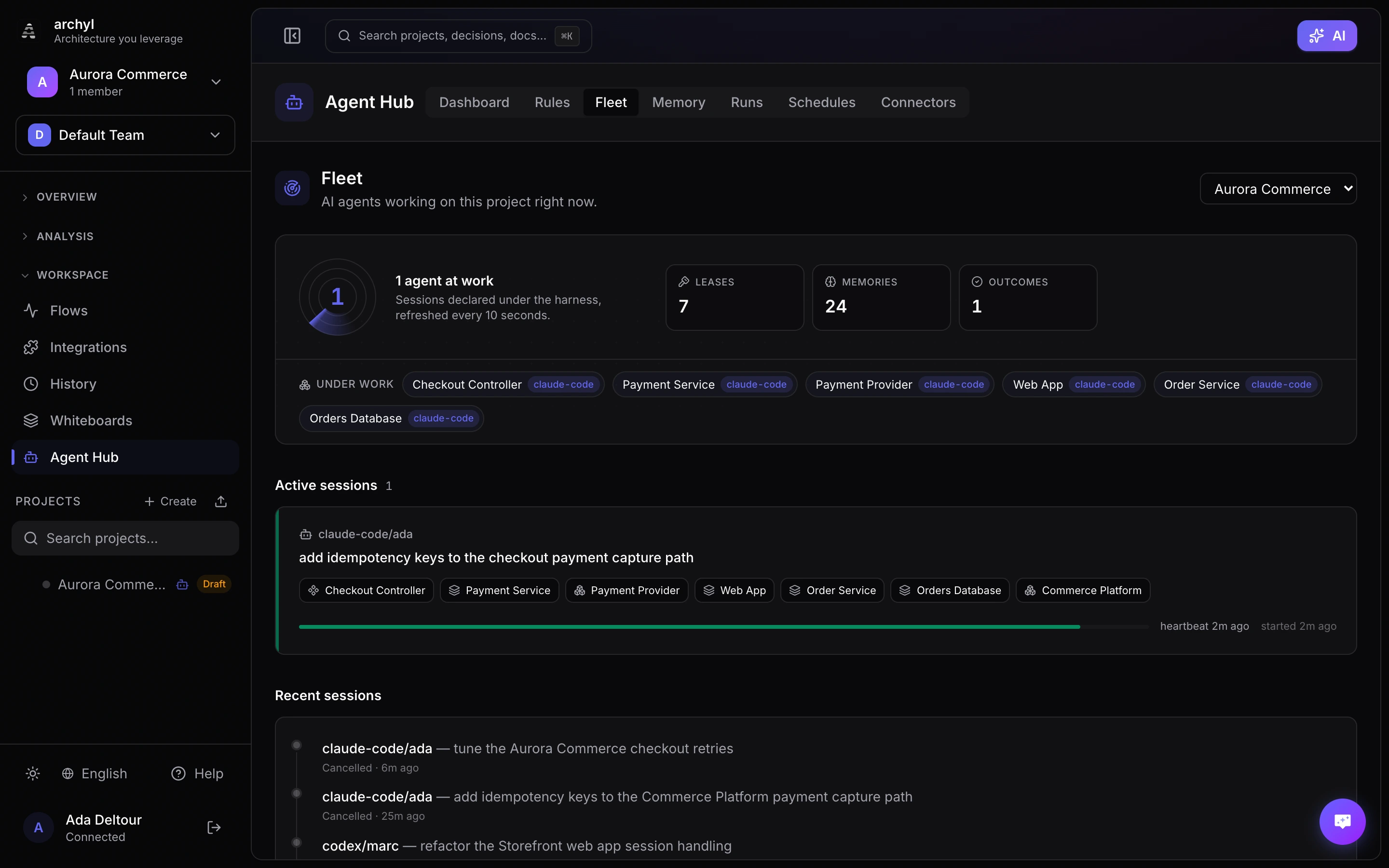
A session whose heartbeat stops is flagged, and expires by itself 30 minutes later. You can also cancel one from here, which releases its leases immediately.
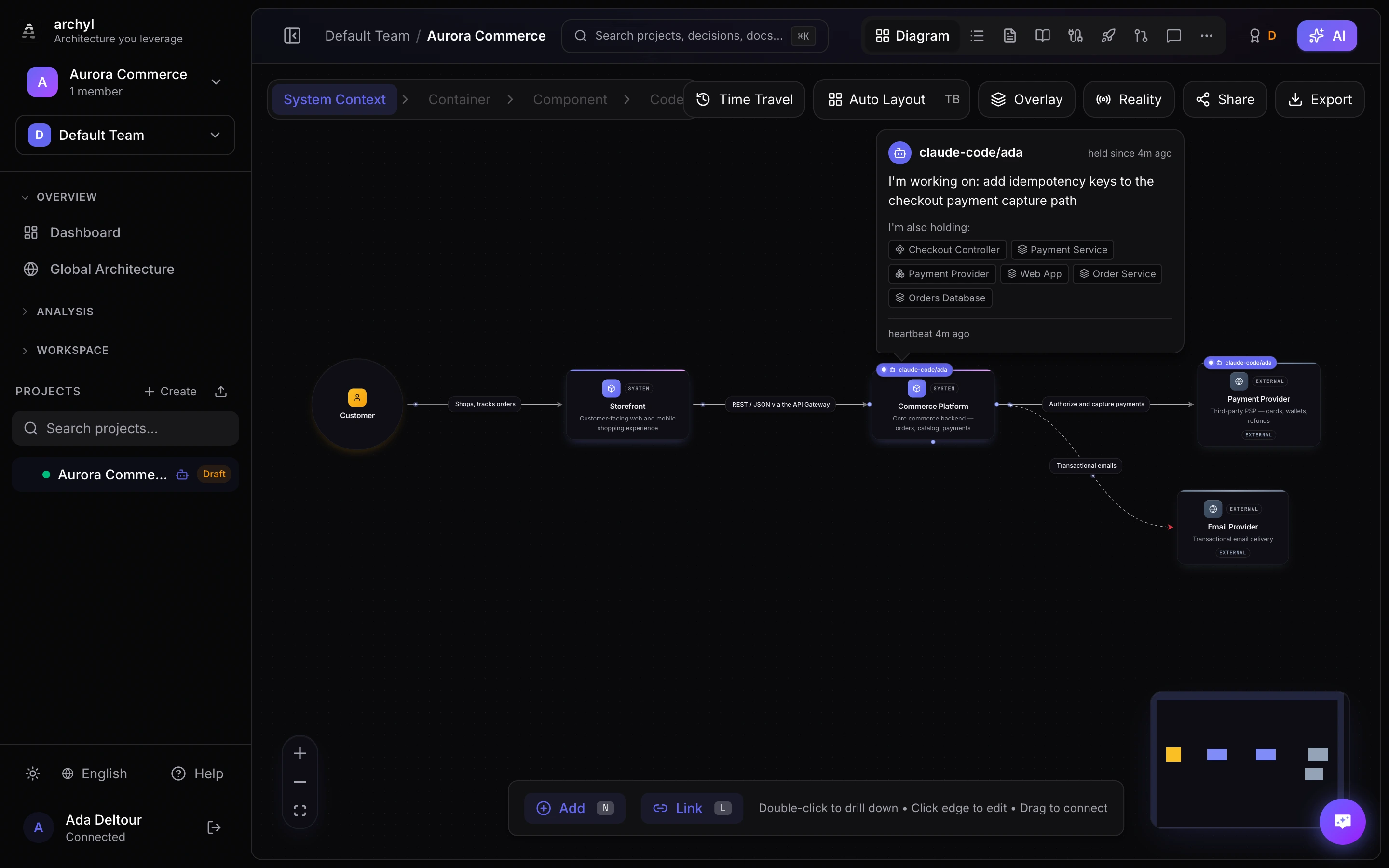
The same information reaches you where you actually look — on the diagram. Any element an agent holds wears a badge with the agent's name, and clicking it asks the agent what it is doing: the declared task, everything else it is holding, and how long ago it last checked in.
For Archyl's managed agents you can also steer a running agent — type a message on the run page and it is injected into the agent's next reasoning step.
The gate
Every session starts with a preflight verdict:
| Gate | Meaning | Agent behavior |
|---|---|---|
allow |
No conflicts, no error-level guardrails | Proceed |
warn |
Another session holds a lease on a target element, or an error-level guardrail applies | Proceed, but address every listed reason |
deny |
Only with exclusive: true — a target element is already being worked on |
Do not work around it; report to the user |
Use exclusive: true for changes that must not race with anyone: schema migrations, contract changes.
Guard configuration
| Variable | Default | Purpose |
|---|---|---|
ARCHYL_API_KEY |
— | Required to activate the Guard |
ARCHYL_PROJECT_ID |
— | Required to activate the Guard |
ARCHYL_API_URL |
https://api.archyl.com |
Self-hosted deployments |
ARCHYL_GUARD_BLOCK |
critical |
critical blocks critical violations; high also blocks high ones; off disables blocking |
A committable .archyl.json at the repository root can carry the project ID instead: { "projectId": "…" }. The API key and URL are read from the environment only, so a repository cannot send them anywhere else: self-hosted instances set ARCHYL_API_URL.
Memory
Session outcomes are only the automatic half of memory. Agents and teammates can also write memory deliberately:
▶ remember(projectId: …, element: "ApiGateway", kind: "pitfall",
    content: "The gateway strips custom headers longer than 8KB — payloads must go in the body.")
rememberpins a fact to an element (or to the whole project), typed as anote,conventionorpitfall. Use it for knowledge that is not visible in the code or the model: deployment quirks, historical reasons, fragile spots.recallsearches all memory — outcomes, notes, conventions, pitfalls — by terms, element or kind. Ranking blends meaning with words, so an agent asking about "rate limiting" finds the note someone else wrote about "throttling". Pass yoursessionIdso the memories you were served can be credited later.find_relevant_contextandstart_work_sessionserve the most recent memories of the matched elements automatically, so the next agent starts with what the previous ones learned.
Writing a memory is deduplicated: re-stating a fact that already exists does not store a second copy, it confirms the existing one (the response says deduplicated: true) — because an agent re-asserting what it learned is evidence, not noise. A memory that is close but not identical is stored and reported back in similarTo, so the author supersedes deliberately instead of silently contradicting.
Memory also learns from use. When a session finishes, usedMemories names the memories it actually relied on. That citation is the strong signal: cited memories keep their rank, while a memory served to five sessions and never named by any of them is demoted as noise. Nothing is deleted automatically — ignored memories surface in a review queue for a human to judge.
Memory has a lifecycle, so it stays true instead of piling up. When a memory served by recall proves accurate, re-attest it with confirm_memory — its freshness clock resets and it keeps outranking older information. When a fact changed, don't leave both versions live: remember(supersedes: "Old title") replaces the old memory, which leaves retrieval but stays in history and in the graph. Everything unconfirmed decays gently in ranking (45-day half-life), and pitfalls always outrank plain notes for an agent about to change code.
Memories form a knowledge graph, Obsidian-style. Give a memory a title and it becomes addressable: any other memory can reference it with [[Title]] in its content. Links also resolve to C4 elements by name ([[ApiGateway]]) and to decisions ([[ADR-17]]) — and a link to a title that does not exist yet stays pending and attaches the moment that memory is created. Every memory exposes its backlinks, so knowledge is navigable in both directions — and recall follows the links: the top matches bring their wiki-linked neighbours with them, marked via.
Memory also notices when the architecture moves underneath it. When an element a memory is pinned to changes, that memory is flagged for review: recall still serves it, but marked [VERIFY — the element drifted since this was written], and it drops in ranking rather than disappearing. A fact written about a service that has since been split is not automatically wrong — it just stops being trustworthy without a human look.
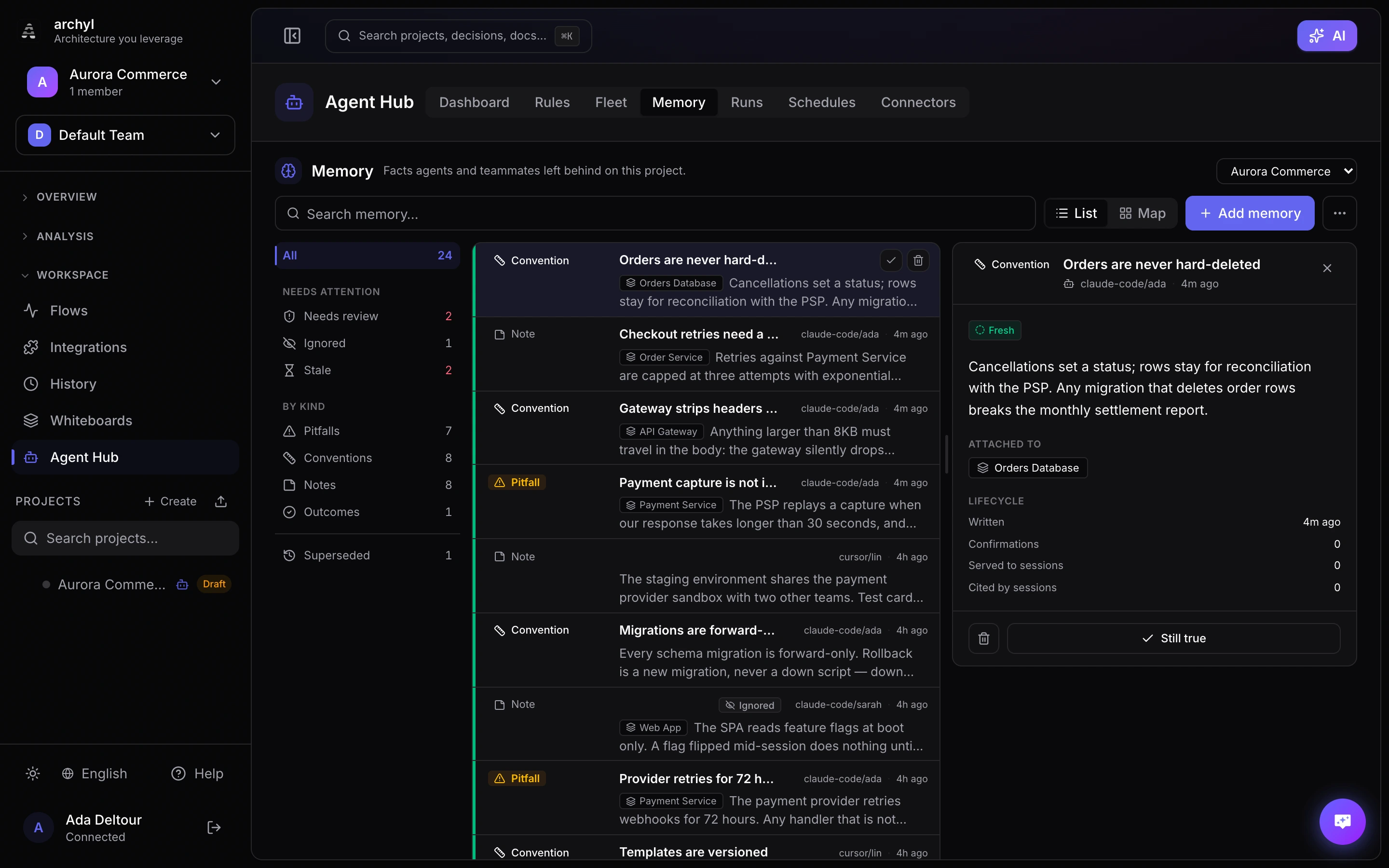
Memory is encrypted at rest like every sensitive content column, and manageable from the UI: the Memory panel in the Agent Hub, plus a per-element section in the diagram's details panel. The panel is built for triage — the left rail counts what needs review, what is being ignored and what has gone stale, then splits the rest by kind, and every row carries a coloured spine for how much to trust it at a glance.
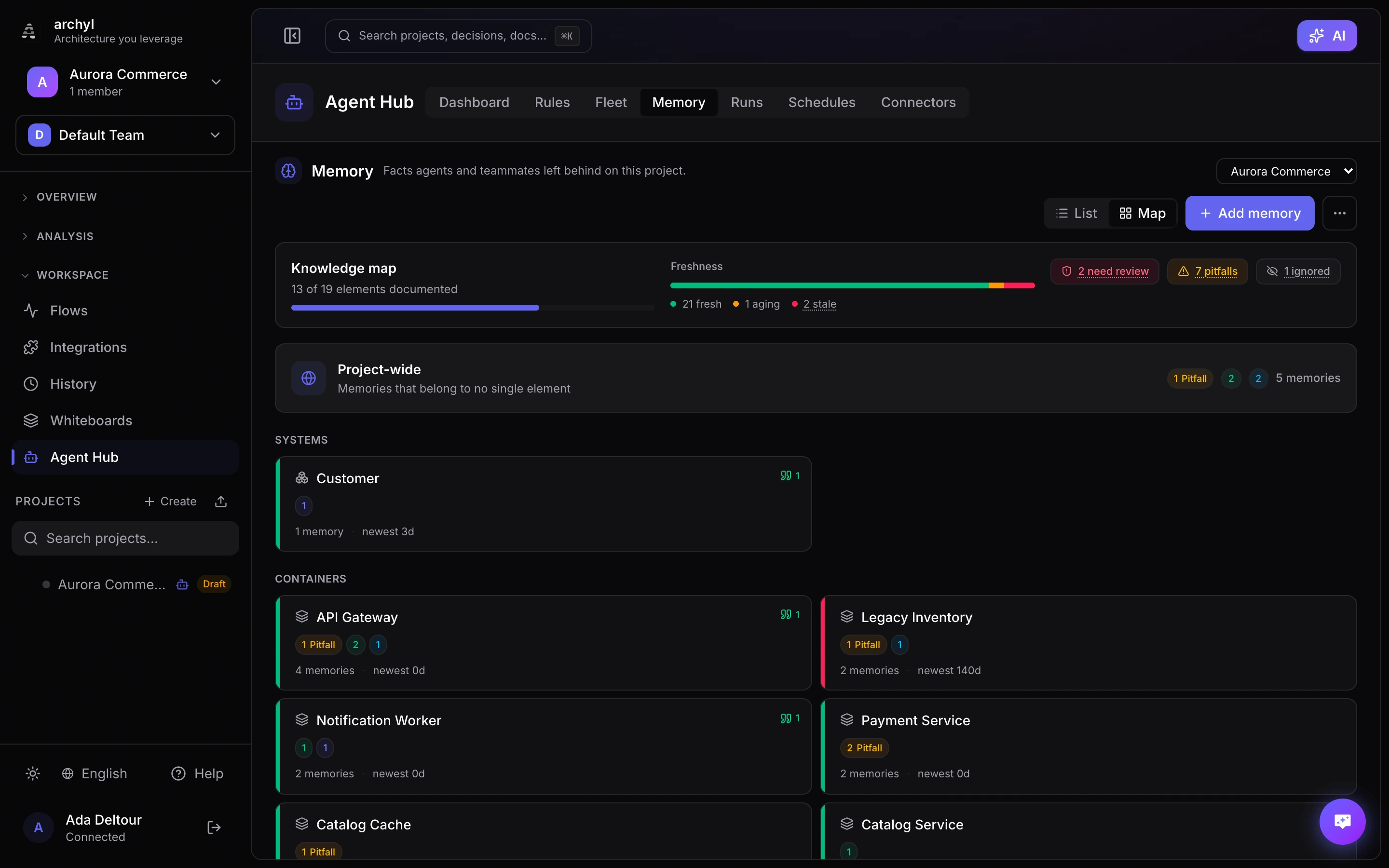
Switch to the knowledge map for the other question: not what do we know but where. One cell per C4 element, showing what the project knows about it and how fresh that knowledge is — including the elements nobody has written anything about yet, which is usually the more useful half of the picture.
In CI
The same bricks run in your pipeline with the GitHub Actions: generate-context commits an archyl.txt briefing for agents without MCP access, conformance-check gates pull requests on your rules, and auto-cr files Architecture Change Requests from merged changes.
Troubleshooting
No sessions appear in the Fleet console. The agent is connected without the harness protocol. Check that the plugin is installed (the archyl-harness skill teaches the protocol) and that the MCP URL includes ?profile=coding — with the full 189-tool catalog, agents often explore instead of following the loop.
The Guard never blocks anything. By design it fails open. Verify ARCHYL_API_KEY and ARCHYL_PROJECT_ID are exported in the environment the agent runs in, and that your project has conformance rules with critical severity.
A session is stuck as active. Sessions expire 30 minutes after their last heartbeat and release their leases automatically. To free the leases immediately, cancel the session from the Fleet console.
Which agents are supported? Anything that speaks MCP gets Context, Plan and the session protocol. The Guard hook and skills currently target Claude Code; other agents can enforce the same rules through run_conformance_check or the CI actions.