Conformance Rules (Guardrails)
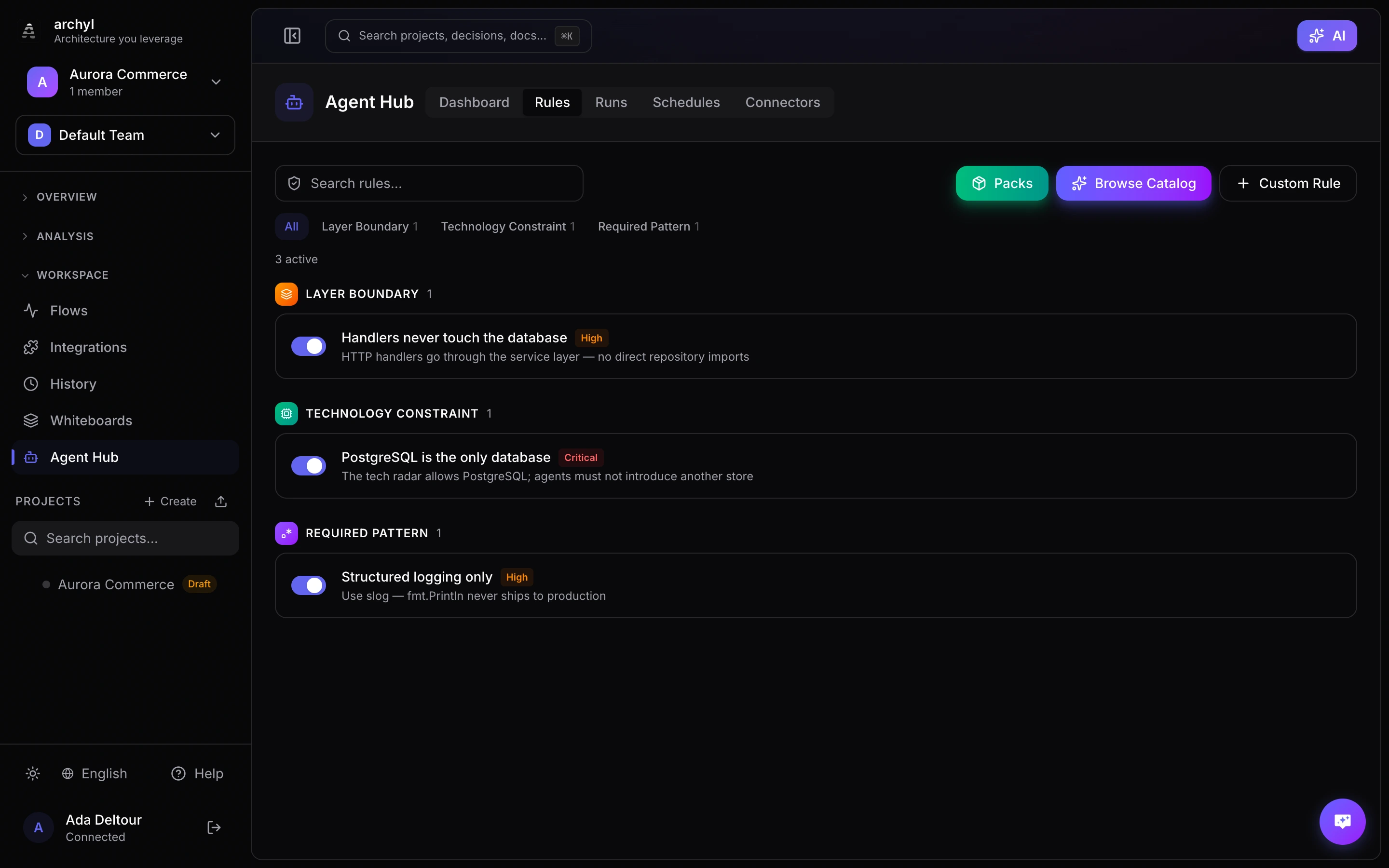
Conformance rules are deterministic checks that validate code changes against your architectural decisions. They enforce naming conventions, technology constraints, layer boundaries, and security patterns — without any AI involved.
Navigate to Agent Hub in the sidebar to manage your conformance rules.
Why Conformance Rules?
When AI coding agents (Claude Code, Cursor, Copilot) generate code, they don't know your architectural decisions. Conformance rules encode those decisions as executable constraints:
- The agent can't use MongoDB if your tech radar says PostgreSQL
- The agent can't put database calls in HTTP handlers if your architecture requires a service layer
- The agent can't add
fmt.Printlnif your team uses structured logging
Rules are evaluated deterministically — no LLM, no probabilistic output. The same code always produces the same result.
Rule Types
Archyl supports seven types of conformance rules:
Required Pattern
Check for patterns that must exist or must not exist in your code.
| Use case | Example |
|---|---|
| Forbid debug logging | Ban fmt.Println, console.log, print() |
| Forbid security risks | Ban eval(), innerHTML, hardcoded passwords |
| Require error handling | Require set -euo pipefail in shell scripts |
| Enforce standards | Ban SELECT * in SQL queries |
Configuration:
- File glob — Only check files matching a pattern (e.g.,
*.go,*.{ts,tsx}) - Forbidden patterns — Regex patterns that trigger a violation when found
- Required patterns — Regex patterns that trigger a violation when missing
File globs support brace expansion: *.{js,jsx,ts,tsx} matches all JavaScript and TypeScript files.
Naming Convention
Validate file, type, and function naming patterns.
| Scope | Example |
|---|---|
| File | Go files must be snake_case.go |
| Type | Exported types must be PascalCase |
| Function | Functions should start with a verb (Get, Create, Delete) |
Configuration:
- Patterns — List of scope (file/type/function) + regex + description
Technology Constraint
Restrict which languages and libraries are allowed in a container.
| Use case | Example |
|---|---|
| Language lock | Backend must be Go only |
| Dependency ban | No lodash (use native JS) |
| Migration enforcement | No moment.js (use date-fns) |
Configuration:
- Allowed languages — Comma-separated list (e.g.,
go, typescript) - Forbidden imports — One import per line
Layer Boundary
Enforce Clean Architecture, Hexagonal Architecture, or DDD layer import rules.
| Layer | Can import from |
|---|---|
| Domain | Nothing (pure business logic) |
| Service | Domain only |
| Adapter | Domain, Service |
| Infrastructure | Domain only |
Configuration:
- Layers — Define each layer with a name, path pattern (glob), and allowed import sources
- Click layer names to toggle import permissions
Contract Compliance
Validate that endpoint handler files contain proper API contract documentation.
Configuration:
- Contract type — HTTP (OpenAPI), gRPC, GraphQL, or AsyncAPI
- Endpoint file patterns — Globs for files containing endpoint definitions
- Strict mode — When enabled, any matching file without contract documentation triggers a violation
Dependency Rule
Enforce forbidden import paths between architectural boundaries.
Configuration:
- Scope — Container or component level
- Forbidden pairs — Source and target path patterns that must never depend on each other (e.g.,
**/service/** -> **/handler/**)
Event Channel Compliance
Validate that event producer/consumer patterns follow naming conventions.
Configuration:
- Producer patterns — Regex patterns identifying event production code (e.g.,
kafka\.Send) - Consumer patterns — Regex patterns identifying event consumption code
- Topic regex — Pattern that valid topic names must match (e.g.,
^[a-z]+\.[a-z]+\.[a-z]+$)
Rule Packs
Packs are curated collections of rules you can install with one click. Instead of adding rules one by one, install a pack and get a complete ruleset for your stack.
Click Packs in the toolbar to browse available packs.
Architecture Packs
| Pack | Rules | What it enforces |
|---|---|---|
| Clean Architecture | 5 | Domain/service/adapter/infra layer boundaries, module isolation |
| Hexagonal Architecture | 4 | Ports & adapters pattern, core isolation |
| Domain-Driven Design | 3 | DDD layers, CQRS command/query separation |
Language Packs
| Pack | Rules | What it covers |
|---|---|---|
| Go Backend | 26 | Error wrapping, goroutine safety, context propagation, naming, no panic, no init() |
| React Frontend | 23 | TypeScript strictness, component patterns, data fetching, no DOM manipulation |
| Next.js Full-Stack | 20 | React rules + SSR safety, window guards, localStorage hooks |
| Python Backend | 16 | Exception handling, async patterns, type hints, no global state |
| Java Backend | 11 | Spring DI patterns, exception handling, no System.exit |
| Rust Backend | 8 | No unwrap/unsafe, proper error types, no todo!() |
| Kotlin / Android | 5 | Null safety, immutability, no println |
| Vue Frontend | 10 | No v-html, TypeScript strictness, no innerHTML |
| .NET / C# Backend | 5 | Async patterns, exception handling, ILogger |
| Swift / iOS | 3 | Optional safety, no force unwrap |
Domain Packs
| Pack | Rules | What it covers |
|---|---|---|
| Security Essentials | 17 | Hardcoded secrets, injection, broken crypto, TLS, CORS |
| DevOps & Infrastructure | 24 | Docker, Kubernetes, Terraform, GitHub Actions, shell scripts |
| API Best Practices | 9 | Status codes, SQL safety, contract docs, no hardcoded URLs |
| Testing & Reliability | 5 | No skipped tests, no .only(), no sleep, no TODO |
| Event-Driven Architecture | 3 | Kafka/RabbitMQ topic naming, no hardcoded topics |
Rule Catalog
Archyl ships with a catalog of 169 pre-built rules across 23 technologies. Browse the catalog by clicking Catalog in the Agent Hub.
Technologies Covered
Go, TypeScript, JavaScript, Python, Java, Kotlin, Rust, C#, C/C++, Ruby, PHP, Swift, React, Vue, Angular, Next.js, Docker, Kubernetes, Terraform, SQL, Shell, YAML, GitHub Actions
Categories
| Category | Examples |
|---|---|
| Architecture & Design | Clean Architecture, Hexagonal, DDD, MVC, CQRS, handler-service-repository |
| Security | No hardcoded secrets, no eval(), no SQL injection, no disabled TLS, no CORS wildcard, no command injection |
| Code Quality | No debug logging, error wrapping, no empty catch, no bare except, no any type, no unwrap() |
| Infrastructure & DevOps | Pin Docker versions, K8s resource limits, no privileged containers, Terraform tags, multi-stage builds |
| Naming Conventions | snake_case, PascalCase, camelCase per language |
| Testing & Reliability | No skipped tests, no .only(), no TODO/FIXME, no sleep in tests |
| Performance | No sync sleep, goroutine safety, no await in loops, no sync I/O in Node.js |
| API & Data | No raw SQL, proper HTTP status codes, contract documentation, no hardcoded URLs |
| Event-Driven | Kafka/RabbitMQ topic naming conventions, no hardcoded topic names |
Click any rule in the catalog to add it — the configuration form pre-fills automatically.
Severity Levels
Each rule has a severity that determines its impact:
| Severity | Meaning | Example |
|---|---|---|
| Critical | Must fix before merge | No hardcoded secrets, no eval(), layer boundary violations |
| High | Should fix before merge | No debug logging, pin Docker versions, no panic in Go |
| Medium | Fix when convenient | Naming conventions, no any type, no var in JS |
| Low | Informational | No TODO/FIXME, no inline styles in React |
A conformance check fails if any critical or high violations are found. Medium and low violations are reported but don't fail the check.
Conformance Dashboard
The Dashboard tab in the Agent Hub provides a real-time overview of all conformance checks across your projects.
What It Shows
- Stats cards — Total checks, pass rate (color-coded), passed count, failed count
- Pass/fail ratio — Visual bar showing the proportion at a glance
- Latest check banner — Status of the most recent check with a link to the full report
- Recent checks list — All checks with status, trigger type, project name, file count, violation count, and time ago
Filtering
Use the project dropdown at the top to filter checks by project, or select "All projects" to see everything.
Check Reports
Click any check to drill into the full report:
- Severity breakdown bar — Proportional visualization of critical/high/medium/low violations
- Violations grouped by file — Collapsible sections with severity, title, description, and suggestion for each violation
- Check metadata — Trigger type, commit SHA, start time, duration
Each check report has its own shareable URL (e.g., /agent/dashboard/:checkId).
Deleting Checks
Use multi-select to delete checks in bulk:
- Click checkboxes next to individual checks, or use "Select all"
- Click the red Delete button that appears
- Checks and their violations are permanently removed
CI/CD Integration
Conformance rules can run automatically on every pull request. See GitHub Actions Integration for setup instructions.
How It Works
- A PR is opened or updated on GitHub
- The Archyl GitHub Action fetches changed files
- Files are sent to the Archyl API for evaluation
- Results appear as a PR comment and commit status check
- The workflow fails if critical or high violations are found
PR Comment
When violations are found, Archyl posts a detailed comment on the PR:
- Summary table with violation counts by severity
- Per-file violations with descriptions and suggestions
- The comment is updated (not duplicated) on subsequent pushes
Managing Rules
Creating Rules
- Click Packs to install a curated ruleset for your stack, or
- Click Catalog to browse and add from the 169 pre-built rules, or
- Click Custom to create a new rule manually
Enabling/Disabling Rules
Toggle the switch next to any rule to enable or disable it. Disabled rules are not evaluated.
Editing Rules
Click the edit icon (pencil) on any rule to modify its name, description, severity, or configuration.
Deleting Rules
Click the delete icon (trash), then confirm. This cannot be undone.
Filtering Rules
- Search — Filter by rule name or description
- Type filter — Click type pills to show only rules of a specific type
MCP Integration
Conformance rules are accessible to AI agents via the MCP server:
Available MCP Tools
| Tool | Description |
|---|---|
run_conformance_check |
Run all enabled rules against provided files and return violations |
list_conformance_rules |
List all rules with optional project filter |
create_conformance_rule |
Create a new rule |
update_conformance_rule |
Update rule config, severity, or enabled state |
delete_conformance_rule |
Delete a rule |
get_agent_context |
Get the full architectural context including active guardrails |
Running Checks from an Agent
The run_conformance_check tool lets AI agents validate code before committing. The agent sends the files it's working on:
{
  "projectId": "your-project-uuid",
  "changedFiles": [
    { "path": "internal/handler/user.go", "status": "modified" }
  ],
  "fileContents": {
    "internal/handler/user.go": "package handler\nimport..."
  }
}
The response includes:
passed— Whether the check passed (no critical/high violations)violations— List of violations with severity, file path, title, and suggestionrulesEvaluated— Which rules were evaluatedfilesAnalyzed— How many files were analyzedcheckId— The check ID (visible in the dashboard)
The agent can use this feedback to fix violations before the code is committed.
Agent Context
The get_agent_context MCP tool returns all active conformance rules as part of the architectural briefing. AI agents that call this tool before starting work will know which guardrails to respect.
REST API
# Rules
GET    /api/v1/conformance/rules              # List rules
POST   /api/v1/conformance/rules              # Create rule
POST   /api/v1/conformance/rules/bulk         # Create multiple rules (used by packs)
GET    /api/v1/conformance/rules/:id          # Get rule
PUT    /api/v1/conformance/rules/:id          # Update rule
DELETE /api/v1/conformance/rules/:id          # Delete rule
POST   /api/v1/conformance/rules/:id/toggle   # Enable/disable

# Checks
POST   /api/v1/projects/:id/conformance/check # Trigger check with changed files
GET    /api/v1/conformance/checks             # List all checks (org-wide, ?projectId= filter)
GET    /api/v1/conformance/checks/:id/report  # Get check report with violations
POST   /api/v1/conformance/checks/delete      # Bulk delete checks { ids: [...] }

# Stats
GET    /api/v1/conformance/stats              # Org-wide statistics
GET    /api/v1/projects/:id/conformance/stats  # Project statistics
All endpoints require authentication (JWT or API key with write scope for mutations).