Production Reality (Living Diagram)
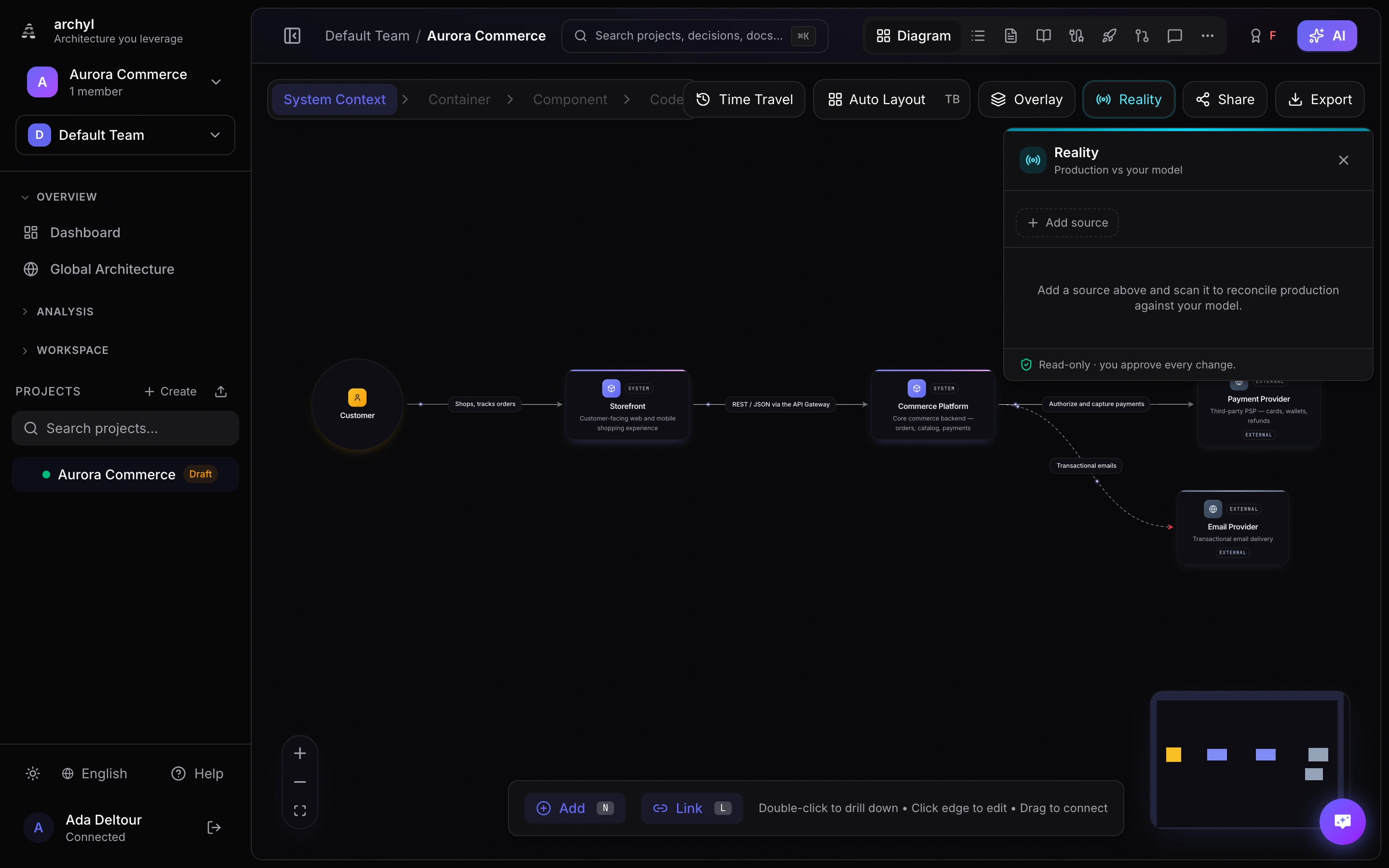
Reality turns your C4 diagram into a living view of what's actually running. Connect read-only production sources — Kubernetes, Datadog, New Relic — and Archyl discovers your real services and their dependencies, then reconciles them against your curated model. Your diagram stops being a snapshot and starts reflecting production.
Reality is read-only and non-destructive: scanning never changes your infrastructure, and it never edits your C4 model on its own. Everything discovered is a proposal you approve.
How it works
Reality keeps three planes cleanly separated:
- Model — your curated C4 architecture (the intent). Only you change it.
- Reality — a continuously refreshed mirror of what's observed in production (the facts).
- Binding — the link between the two, which you confirm.
Scanners only ever write to the Reality and Binding planes. Promoting a discovered resource into your model is always an explicit click.
Step 1 — Connect a source in your organization
Credentials live in your organization's marketplace, so you configure each source once and any project can use it.
Go to Organization → Marketplace and connect one of:
Kubernetes
A read-only connection to your cluster's API.
- API Server URL — e.g.
https://10.0.0.1:6443 - Read-only ServiceAccount Token — create a
ServiceAccountbound to the built-inviewClusterRole, then generate a token - Skip TLS Verification — set to
trueonly for self-signed dev clusters
Archyl never writes to your cluster — it only calls read endpoints (describe/list).
Datadog
- API Key and Application Key (with APM read)
- Site —
datadoghq.com,datadoghq.eu,us5.datadoghq.com, … (must match your account region)
Datadog reads its APM Service Map, including inferred external dependencies (databases, queues, third-party services).
New Relic
- User API Key (
NRAK-…) — used to read entities and relationships - Account ID (optional)
- Region —
USorEU(must match your account)
New Relic reads APM applications and OpenTelemetry services plus their CALLS relationships.
Step 2 — Add the source to a project
Open a project diagram and click Reality in the toolbar (top right). The Reality panel opens on the right.
- Click Add source.
- Pick one of your connected integrations.
- Add the project scope — a Kubernetes namespace or a Datadog/New Relic environment (e.g.
production). Leave it blank to include everything. - Click Add & scan.
A project can have any number of sources — Kubernetes and Datadog, just one, or several.
Step 3 — Scan
Each source scans independently. Use the refresh icon on a source to re-scan it. Discovery is idempotent: re-scanning updates what's already there instead of duplicating it, and anything that disappeared from production is flagged (never deleted).
Observability sources can lag: services usually appear within minutes, but relationships are computed from trace analysis and may take 10–30 minutes of sustained traffic to populate.
Step 4 — Reconcile resources
The Resources tab groups what was discovered:
- Unmodeled in production — running in production but not yet on your diagram. For each, you can:
- Bind — link it to a suggested existing C4 element.
- Promote — turn it into a new C4 element (see below).
- Ignore — dismiss it (recoverable).
- Drifted — bound to your model but its production state diverged (e.g. unhealthy, or vanished).
- In your model — confirmed matches between production and C4.
- Orphan — in your model but with no production counterpart.
Use the filter field to search by name, kind, or namespace.
Promoting a service into the container level
Promoting creates a new C4 container from a discovered service. Because containers live inside a system, open the system you want first (drill into the container level). If no system is open, Promote is disabled with a hint. The new container lands in the system you're viewing.
Step 5 — Reconcile connections
The Connections tab lists discovered dependencies (who calls whom). A connection is promotable once both of its endpoints are in your model (bound or promoted). Click Promote to draw it as a real relationship on your diagram. Promoted connections drop off the proposed list automatically.
The Reality lens on the diagram
While the Reality panel is open, the canvas turns on a live skin: C4 elements that are backed by a confirmed production resource show a small health dot (and an instance count) at the top-right. This stays non-destructive — it's an overlay, not an edit. Promoted services render as clean, normal nodes.
Safety and limits
- Read-only — Reality never writes to your production systems and never auto-edits your C4 model. You approve every change.
- Per-source isolation — scanning one source never affects another's data.
- Reversible — bindings can be unbound, ignored items are recoverable, and promoted elements are normal C4 elements you can edit or delete.
- Trust levels — relationships are tagged by origin: observed (from telemetry, the strongest signal) vs config-derived (from cluster config). Telemetry sources (Datadog, New Relic, Kubernetes + a service mesh) give the most complete dependency graph.