架构即代码
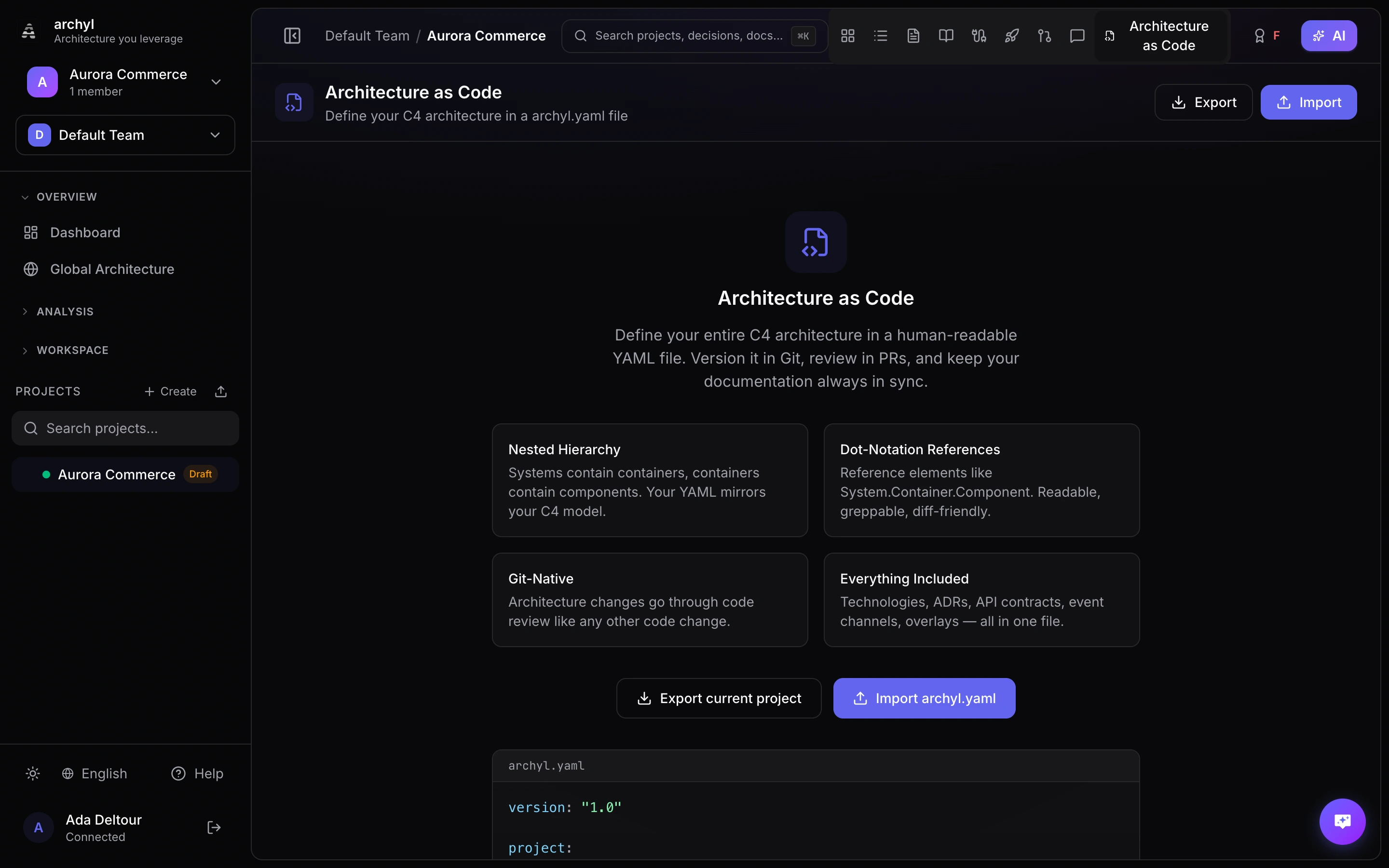
Archyl 允许您在单个 YAML 文件 archyl.yaml 中定义完整的 C4 架构。将它提交到代码仓库,与代码一同编辑,再由 CI/CD 自动保持图表同步。
概述
archyl.yaml 文件是对您架构的声明式描述。它支持:
- 全部四个 C4 层级(系统、容器、组件、代码)
- 任意元素之间的关系
- 技术、环境和发布
- ADR、文档、API 契约和事件通道
- 用于图表分组的可视化叠加层
- 通过
include支持 Monorepo
您可以手动编写该文件,也可以从现有项目导出,或将两种方式结合使用。
文件格式
Archyl 会在代码仓库根目录查找 DSL 文件,并按以下顺序尝试这些文件名:
archyl.yaml.archyl.yamlarchyl.yml.archyl.yml
Schema 参考
根结构
version: "1.0"

project:
  name: My Platform
  description: E-commerce platform serving 10M users
  tags: [e-commerce, saas]

technologies: [...]
environments: [...]
systems: [...]
relationships: [...]
overlays: [...]
events: [...]
api_contracts: [...]
adrs:
  folder: docs/adrs
  records: [...]
docs:
  folder: docs
  records: [...]
releases: [...]
include: [...]
只有 version 是必填项。其他各部分都是可选的,只需包含您需要的内容。
系统(C4 第 1 层)
系统是 C4 模型中的顶层元素。
systems:
  - name: Payment Service
    description: Handles all payment processing
    type: software_system   # person | software_system | external_system
    external: false
    tags: [payments, critical]
    technologies: [Go, PostgreSQL]
    owners:
      teams: [backend-team]
      users: [vincent]
    containers: [...]
| 字段 | 必填 | 描述 |
|---|---|---|
name |
是 | 唯一的系统名称 |
description |
否 | 该系统的作用 |
type |
否 | person、software_system 或 external_system |
external |
否 | 是否为外部系统 |
tags |
否 | 分类标签 |
technologies |
否 | 使用的技术(引用技术目录) |
owners |
否 | 负责的团队和用户 |
containers |
否 | 嵌套的容器(C4 第 2 层) |
容器(C4 第 2 层)
容器嵌套在其父系统中。
systems:
  - name: Payment Service
    containers:
      - name: API Gateway
        description: REST API for payment operations
        type: api
        tags: [rest, public]
        technologies: [Go, Fiber]
        owners:
          teams: [backend-team]
        components: [...]
可用的容器类型:web_app、mobile_app、desktop_app、api、database、file_storage、message_queue、cache、service、function、worker、consumer、infrastructure、gateway、library。
在 Monorepo 中通过 include 使用多个文件时,请使用 parent_system 指定该容器所属的系统:
# In services/payments/archyl.yaml
containers:
  - name: Payments API
    parent_system: Payment Service
    type: api
组件(C4 第 3 层)
组件嵌套在其父容器中。
containers:
  - name: API Gateway
    components:
      - name: PaymentHandler
        description: HTTP handler for payment endpoints
        type: handler
        file: internal/handler/payment.go
        tags: [http]
        technologies: [Go]
        code: [...]
可用的组件类型:controller、service、repository、handler、middleware、model、util、config、adapter、port、resource、module、job、bundle、plugin、workflow、activity、entity。
代码元素(C4 第 4 层)
代码元素嵌套在其父组件中。
components:
  - name: PaymentHandler
    code:
      - name: ProcessPayment
        description: Handles payment processing requests
        type: function
        language: go
        file: internal/handler/payment.go
        line_start: 42
        line_end: 87
        visibility: public
        signature: "func (h *PaymentHandler) ProcessPayment(c *fiber.Ctx) error"
        methods:
          - name: validate
            signature: "func validate(req PaymentRequest) error"
            return_type: error
            visibility: private
        properties:
          - name: maxRetries
            type: int
            visibility: private
            readonly: true
可用的代码元素类型:class、interface、struct、function、method、enum、constant、type。
关系
关系可以连接任意两个元素,嵌套元素使用点表示法引用。
relationships:
  - from: Payment Service.API Gateway
    to: Payment Service.Database
    label: Reads/writes payment data
    type: uses
    technologies: [SQL, PostgreSQL]
    tags: [data-access]
    style:
      color: "#6366f1"
      width: 2
      style: solid       # solid | dashed | dotted
      animated: false
点表示法格式:System.Container.Component.CodeElement。只需写出所需的层级:Payment Service 引用系统,Payment Service.API Gateway 引用容器。
可用的关系类型:uses、depends_on、calls、reads_from、writes_to、sends_to、receives_from、implements、extends、contains、deployed_on、provisions、publishes_to、consumes_from。
技术
定义整个架构中所用技术的目录。
technologies:
  - name: Go
    description: Primary backend language
    category: programming_language
    icon: go
  - name: PostgreSQL
    description: Main relational database
    category: database
    icon: postgresql
可用的类别:programming_language、framework、database、message_broker、object_storage、transport_protocol、cloud_service、devops_tool、library、runtime、cache、other。
环境
为发布定义部署环境。
environments:
  - name: Production
    color: "#22c55e"
  - name: Staging
    color: "#f59e0b"
  - name: Development
    color: "#6366f1"
发布
跨环境和元素跟踪带版本号的部署。
releases:
  - version: "2.4.0"
    status: deployed          # planned | in_progress | deployed | rolled_back | failed
    changelog: "Added payment retry logic and improved error handling"
    environment: Production
    container: Payment Service.API Gateway
    released_at: "2026-03-10T14:00:00Z"
    source: github_action
    source_url: "https://github.com/org/repo/actions/runs/12345"
事件通道
定义服务之间的异步消息通信。
events:
  - name: PaymentCompleted
    description: Fired when a payment is successfully processed
    direction: produce         # produce | consume
    broker: kafka              # kafka | nats | sqs | rabbitmq | redis | pulsar | custom
    topic: payments.completed
    schema_format: json_schema # json_schema | avro | protobuf | text
    schema: |
      { "type": "object", "properties": { "paymentId": { "type": "string" } } }
    links:
      - Payment Service.API Gateway
API 契约
将 API 规范附加到架构上。
api_contracts:
  - name: Payment API
    description: REST API for payment operations
    type: http                 # http | grpc | graphql | async
    version: "2.0"
    endpoint: /api/v2/payments
    file: docs/openapi.yaml    # path to spec file in repo
    links:
      - Payment Service.API Gateway
您可以使用 file 引用代码仓库中的规范文件,也可以使用 content 直接内联规范内容。
架构决策记录(ADR)
adrs:
  folder: docs/adrs            # optional: path to ADR folder in repo
  records:
    - title: Use event-driven architecture for payments
      number: 7
      status: accepted         # proposed | accepted | deprecated | superseded
      date: "2026-02-15"
      context: We need to decouple payment processing from order management
      decision: Use Kafka events for async communication between services
      consequences: Added complexity but improved resilience and scalability
      tags: [architecture, messaging]
      links:
        - Payment Service
文档
docs:
  folder: docs                 # optional: path to docs folder in repo
  records:
    - title: Payment Processing Guide
      file: docs/payments.md   # path to markdown file in repo
      tags: [payments, guide]
      links:
        - Payment Service.API Gateway
您可以使用 file 引用代码仓库中的 Markdown 文件,也可以使用 content 直接内联内容。
叠加层
显示在图表上的可视化分组。
overlays:
  - name: Payment Domain
    description: All payment-related services
    color: "#6366f1"
    level: 2                   # C4 level (1=system, 2=container, 3=component, 4=code)
    elements:
      - Payment Service.API Gateway
      - Payment Service.Database
      - Payment Service.Worker
Include(Monorepo 支持)
对于 Monorepo,可以将架构拆分到多个文件中,再合并在一起:
include:
  - services/payments/archyl.yaml
  - services/orders/archyl.yaml
  - services/users/archyl.yaml
每个被包含的文件都遵循相同的 schema。当容器定义在单独的文件中时,请在容器上使用 parent_system 指定其所属的系统。
完整示例
version: "1.0"

project:
  name: E-Commerce Platform
  description: Online marketplace with payment processing
  tags: [e-commerce, saas, marketplace]

technologies:
  - name: Go
    category: programming_language
  - name: React
    category: framework
  - name: PostgreSQL
    category: database
  - name: Kafka
    category: message_broker
  - name: Redis
    category: cache

environments:
  - name: Production
    color: "#22c55e"
  - name: Staging
    color: "#f59e0b"

systems:
  - name: Storefront
    description: Customer-facing web application
    type: software_system
    technologies: [React]
    containers:
      - name: Web App
        type: web_app
        technologies: [React]
      - name: BFF
        description: Backend for frontend
        type: api
        technologies: [Go]

  - name: Payment Service
    description: Handles payment processing
    type: software_system
    technologies: [Go, PostgreSQL]
    containers:
      - name: API
        type: api
        technologies: [Go]
        components:
          - name: PaymentHandler
            type: handler
          - name: PaymentService
            type: service
          - name: PaymentRepository
            type: repository
      - name: Database
        type: database
        technologies: [PostgreSQL]
      - name: Worker
        type: worker
        technologies: [Go]

  - name: Stripe
    description: Third-party payment processor
    type: external_system
    external: true

relationships:
  - from: Storefront.Web App
    to: Storefront.BFF
    label: API calls
    type: uses
    technologies: [HTTPS]
  - from: Storefront.BFF
    to: Payment Service.API
    label: Process payments
    type: calls
    technologies: [gRPC]
  - from: Payment Service.API
    to: Payment Service.Database
    label: Reads/writes payment data
    type: uses
    technologies: [SQL]
  - from: Payment Service.API
    to: Stripe
    label: Process charges
    type: calls
    technologies: [HTTPS]
  - from: Payment Service.Worker
    to: Payment Service.Database
    label: Polls for pending payments
    type: reads_from

events:
  - name: PaymentCompleted
    broker: kafka
    topic: payments.completed
    direction: produce
    links:
      - Payment Service.API

overlays:
  - name: Payment Domain
    level: 2
    color: "#6366f1"
    elements:
      - Payment Service.API
      - Payment Service.Database
      - Payment Service.Worker

releases:
  - version: "1.2.0"
    status: deployed
    environment: Production
    container: Payment Service.API
    changelog: Added retry logic for failed charges
    released_at: "2026-03-01T10:00:00Z"
从代码仓库同步
如果您的代码仓库包含 archyl.yaml,可以直接在 Archyl 界面中同步:
- 前往 项目设置 > 架构即代码
- 点击 立即同步
Archyl 会从代码仓库的默认分支(或 DSL 设置中配置的分支)获取该文件并导入。已存在的元素会被更新,新元素会被创建。
CI/CD 集成
GitHub Action(官方)
官方的 archyl-com/actions/sync GitHub Action 是保持架构同步最简单的方式。它会读取您的 archyl.yaml,推送到 Archyl API,并报告创建或更新了哪些内容。
最简配置:
name: Sync Architecture
on:
  push:
    branches: [main]
    paths: ['archyl.yaml']
jobs:
  sync:
    runs-on: ubuntu-latest
    steps:
      - uses: actions/checkout@v4
      - uses: archyl-com/actions/sync@v1
        with:
          api-key: ${{ secrets.ARCHYL_API_KEY }}
          project-id: 'your-project-uuid'
输出摘要:
- uses: archyl-com/actions/sync@v1
  id: sync
  with:
    api-key: ${{ secrets.ARCHYL_API_KEY }}
    project-id: 'your-project-uuid'
- run: echo "${{ steps.sync.outputs.summary }}"
自定义文件路径(Monorepo):
- uses: archyl-com/actions/sync@v1
  with:
    api-key: ${{ secrets.ARCHYL_API_KEY }}
    project-id: 'your-project-uuid'
    file: 'services/payments/archyl.yaml'
自托管 Archyl:
- uses: archyl-com/actions/sync@v1
  with:
    api-url: 'https://archyl.your-company.com'
    api-key: ${{ secrets.ARCHYL_API_KEY }}
    project-id: 'your-project-uuid'
Action 输入
| 输入 | 必填 | 默认值 | 描述 |
|---|---|---|---|
api-key |
是 | 具有写入权限的 Archyl API 密钥 | |
project-id |
是 | Archyl 项目 UUID | |
api-url |
否 | https://api.archyl.com |
API 基础 URL(用于自托管) |
file |
否 | archyl.yaml |
YAML 文件相对于代码仓库根目录的路径 |
Action 输出
| 输出 | 描述 |
|---|---|
systems-created |
创建的系统数量 |
containers-created |
创建的容器数量 |
components-created |
创建的组件数量 |
relationships-created |
创建的关系数量 |
summary |
便于阅读的同步结果摘要 |
GitLab CI/CD
sync-architecture:
  stage: deploy
  only:
    changes: [archyl.yaml]
  script:
    - |
      curl -sf -X POST https://your-instance.com/api/v1/projects/${PROJECT_ID}/dsl/ingest \
        -H "X-API-Key: ${ARCHYL_API_KEY}" \
        -H "Content-Type: application/json" \
        -d "{\"content\": $(cat archyl.yaml | jq -Rs .)}"
REST API
您可以从任意 CI/CD 系统或脚本推送 DSL 内容:
curl -X POST https://your-instance.com/api/v1/projects/{projectId}/dsl/ingest \
  -H "X-API-Key: your-api-key" \
  -H "Content-Type: application/json" \
  -d "{\"content\": $(cat archyl.yaml | jq -Rs .)}"
ingest 端点会返回所创建内容的摘要:
{
  "source": "api",
  "import": {
    "systemsCreated": 2,
    "containersCreated": 5,
    "componentsCreated": 12,
    "codeElementsCreated": 0,
    "relationshipsCreated": 8,
    "overlaysCreated": 1,
    "technologiesCreated": 4,
    "adrsCreated": 0,
    "docsCreated": 0,
    "eventsCreated": 1,
    "apiContractsCreated": 0,
    "environmentsCreated": 2,
    "releasesCreated": 1
  }
}
导出为 YAML
您可以将任何现有项目导出为 archyl.yaml 文件:
- 打开您的项目
- 点击工具栏中的 导出
- 选择 YAML(架构即代码)
这会生成一个完整的 archyl.yaml,您可以将其提交到代码仓库。基于现有项目或 AI 发现的架构来创建这个文件,是一个很好的起点。
您也可以通过 API 导出:
curl -H "X-API-Key: your-api-key" \
  https://your-instance.com/api/v1/projects/{projectId}/dsl/export \
  -o archyl.yaml
用于 IDE 支持的 JSON Schema
Archyl 为 archyl.yaml 文件提供 JSON Schema,让您的编辑器能够提供自动补全和校验。Schema 地址为:
https://your-instance.com/api/v1/dsl/schema
VS Code
在 archyl.yaml 中添加以下内容即可启用 schema 校验:
# yaml-language-server: $schema=https://your-instance.com/api/v1/dsl/schema
version: "1.0"
或在 VS Code 设置中全局配置:
{
  "yaml.schemas": {
    "https://your-instance.com/api/v1/dsl/schema": ["archyl.yaml", ".archyl.yaml"]
  }
}
图片与 PDF 导出
Archyl 还支持将图表导出为图片,用于演示文稿和文档。
可用格式
| 格式 | 最适用于 |
|---|---|
| PNG | 演示文稿、文档、聊天分享 |
| SVG | 设计工具、网页嵌入、打印 |
| 正式文档、存档 |
如何导出
- 导航到要导出的 C4 层级
- 点击工具栏中的 导出
- 选择格式(PNG、SVG 或 PDF)
- 配置选项(背景、质量、视口)
- 点击 导出
勾选 导出所有层级 可为每个 C4 层级分别生成文件。
导出选项
- 背景:包含深色画布背景,或使用透明背景
- 质量(仅限 PNG):标准、高或印刷分辨率
- 视口:适应内容、包含边距,或导出当前视图
导入项目
您可以通过从多种格式导入来创建新项目。Archyl 支持五种导入源:
| 格式 | 文件类型 | 来源工具 |
|---|---|---|
| Archyl YAML | .yaml / .yml |
Archyl 原生格式 |
| Structurizr DSL | .dsl |
Structurizr |
| LikeC4 | .c4 / .likec4 |
LikeC4 |
| IcePanel JSON | .json |
IcePanel |
| Backstage JSON | .json |
Backstage |
如何导入
- 在项目列表中点击 导入项目
- 选择源格式标签页(Archyl YAML、Structurizr DSL、LikeC4、IcePanel 或 Backstage)
- 上传文件或粘贴其内容
- 点击 验证 预览将要创建的内容
- 点击 创建项目
整个过程不到一分钟。所有系统、容器、组件、关系、技术和标签都会自动导入。
项目名称和描述
创建项目需要名称,而每种格式承载名称的位置各不相同。缺少名称是导入被拒绝的最常见原因。
| 格式 | 项目名称 | 项目描述 |
|---|---|---|
| Archyl YAML | project.name — 必填 |
project.description |
| Structurizr DSL | workspace 名称 — 必填 | workspace 描述 |
| LikeC4 | 第一个顶层元素,否则为 Imported LikeC4 Project |
不可用 |
| IcePanel JSON | domain 对象,否则为 Imported IcePanel Project |
不可用 |
| Backstage JSON | 始终为 Imported Backstage Catalog |
不可用 |
只有 Archyl YAML 和 Structurizr DSL 会在此检查中失败。其他格式始终会回退到自动生成的名称,您可以在导入后修改。
在 Structurizr 中,名称和描述是 workspace 头部的两个可选字符串:
workspace "My Platform" "Microservices architecture" {
    model {
        user = person "User"
        platform = softwareSystem "My Platform" {
            api = container "API" "REST API" "Go"
        }
        user -> api "Uses"
    }
}
没有名称的 workspace { ... } 能够正确解析,但无法创建项目:Archyl 会拒绝它,并要求您为 workspace 命名。导入到现有项目则没有这个要求:此时 workspace 名称会被忽略,因为项目已经有名称了。
Structurizr DSL 导入
Archyl 会解析 Structurizr 的 .dsl 工作区文件,并提取完整的 C4 模型:
person、softwareSystem、container、component元素- 所有
->关系,包括其描述和技术 - 根据标签识别外部系统
- 从位置参数中提取技术
- 分组映射为标签
视图、样式、主题和部署节点会被跳过(Archyl 有自己的可视化层)。
workspace 的名称和描述会成为项目的名称和描述,参见上文的 项目名称和描述 一节。没有名称的 workspace 可以导入到现有项目,但无法创建新项目。
拆分为多个文件的工作区(!include)
拆分成多个文件的工作区(例如使用 !include systems/payments.dsl 等)无法作为单个文件导入,因为被包含的文件不在其中,无法解析。请改为在 Structurizr DSL 标签页中将整个工作区打包为 .zip 上传:压缩包中的文件会被解压,所有 !include 都会基于这些文件解析。
- 入口文件优先取压缩包中的
workspace.dsl,否则取层级最浅的.dsl文件。Archyl 会说明实际使用了哪个文件。 - 路径相对于执行包含的文件解析,因此嵌套的 include 可以正常工作。
- 包含一个目录时,会按名称顺序引入该目录下直接存在的所有
.dsl文件。 - include 循环会被中断并报告,而不会导致导入失败。
- 远程目标(
!include https://…)会被拒绝,超出压缩包范围的路径会被跳过。
任何无法解析的内容都会作为警告出现在导入结果中,工作区的其余部分仍会正常导入。
压缩包限制:
| 限制项 | 值 |
|---|---|
| 压缩包大小 | 10 MiB |
| 压缩包内的文件数 | 500 |
| 解压后的总大小 | 50 MiB |
| 单个文件大小 | 5 MiB(超出的文件会被跳过,并给出警告) |
| include 嵌套层数 | 10 层 |
只会保留 .dsl、.md、.json、.yaml、.yml 和 .txt 文件,压缩包中的其他文件都会被忽略。
通过 API 导入时,请以 multipart 表单数据的形式在 file 字段中发送压缩包,并可选地用 entry 字段指定入口文件:POST /api/v1/dsl/validate-archive 用于校验压缩包,POST /api/v1/projects/{id}/dsl/import-archive 将其导入到某个项目,POST /api/v1/dsl/import-project-archive 则基于它创建新项目。import_dsl MCP 工具和仓库同步只读取单个文件,不会解析 !include。
LikeC4 导入
Archyl 是第一个支持导入 LikeC4 文件的工具。导入器能够处理 LikeC4 的独有特性:
specification块中的自定义元素类型会映射到 C4 层级- 嵌套的元素层次结构会解析为系统、容器和组件
technology:和description:属性(带或不带冒号语法均可)#hashtag标签会转换为标准标签- 识别
#external标签以进行边界分类 - 多个
model块会自动合并 - 支持单引号和三引号字符串
IcePanel JSON 导入
IcePanel 的 JSON 导出格式完全受支持:
system、actor、app、store、component对象类型映射为 C4 元素external: true字段用于将系统归类为外部系统modelConnections映射为关系tagIds会根据tags数组解析为标签名称domain对象用作项目名称
Backstage 导入
Archyl 可以导入 Backstage /api/catalog/entities 端点返回的 Software Catalog JSON:
System实体映射为 Archyl 系统(不同命名空间之间的同名冲突会自动消歧)Component和Resource实体会作为容器归入其所属的系统(通过spec.system或partOf关系确定)- 没有父系统的 Component/Resource 会归入一个自动生成的 Uncategorized 系统
Resource类型映射为 Archyl 容器类型:s3-bucket→file_storage;rds-instance、dynamo-db-table、valkey-cluster、opensearch-domain→database;kafka-topic、sqs-queue→message_queue;repository→library;其他所有类型 →infrastructureComponent类型映射:service→service、cronworkflow→worker、website→web_app、library→libraryAPI实体会导入为 API 契约,内联的spec.definition(OpenAPI / gRPC / GraphQL / AsyncAPI)作为内容保留,并关联到提供方和消费方组件dependsOn、consumesApi、producesTo、consumesFrom、versionedIn(及其反向关系)会转换为 Archyl 关系metadata.namespace、spec.lifecycle和spec.type会作为标签呈现User和Group实体会被跳过:Backstage 的人员/团队关系图不属于 C4 概念
导出您的目录:
curl -H "Authorization: Bearer $BACKSTAGE_TOKEN" \
  https://backstage.your-company.com/api/catalog/entities \
  -o entities.json
然后将 entities.json 拖入导入对话框的 Backstage 标签页。大型目录中的 Resource 列表可能会生成数千个容器,请检查导入结果,并删除不需要的内容。
通过 MCP 导入(AI 代理)
同样的导入功能也可以通过 MCP 工具 import_dsl 使用:
Use the import_dsl tool with:
- projectId: your project UUID
- content: the DSL/JSON content
- format: "archyl", "structurizr", "likec4", "icepanel", or "backstage"
这让 AI 编码代理(Claude Code、Cursor、Windsurf)能够以编程方式导入架构文件。
导入到现有项目
除了创建新项目,您还可以导入到现有项目中:
- 打开您的项目
- 前往 架构即代码
- 点击 导入
- 选择格式并上传
已存在的元素会被更新,新元素会被创建。
后续步骤
- API 概览 — DSL 端点的完整 API 参考
- 分享与嵌入 — 分享实时图表
- 发布管理 — 在 YAML 中跟踪部署
- Webhook 通知 — 在架构变更时获得通知