코드형 아키텍처
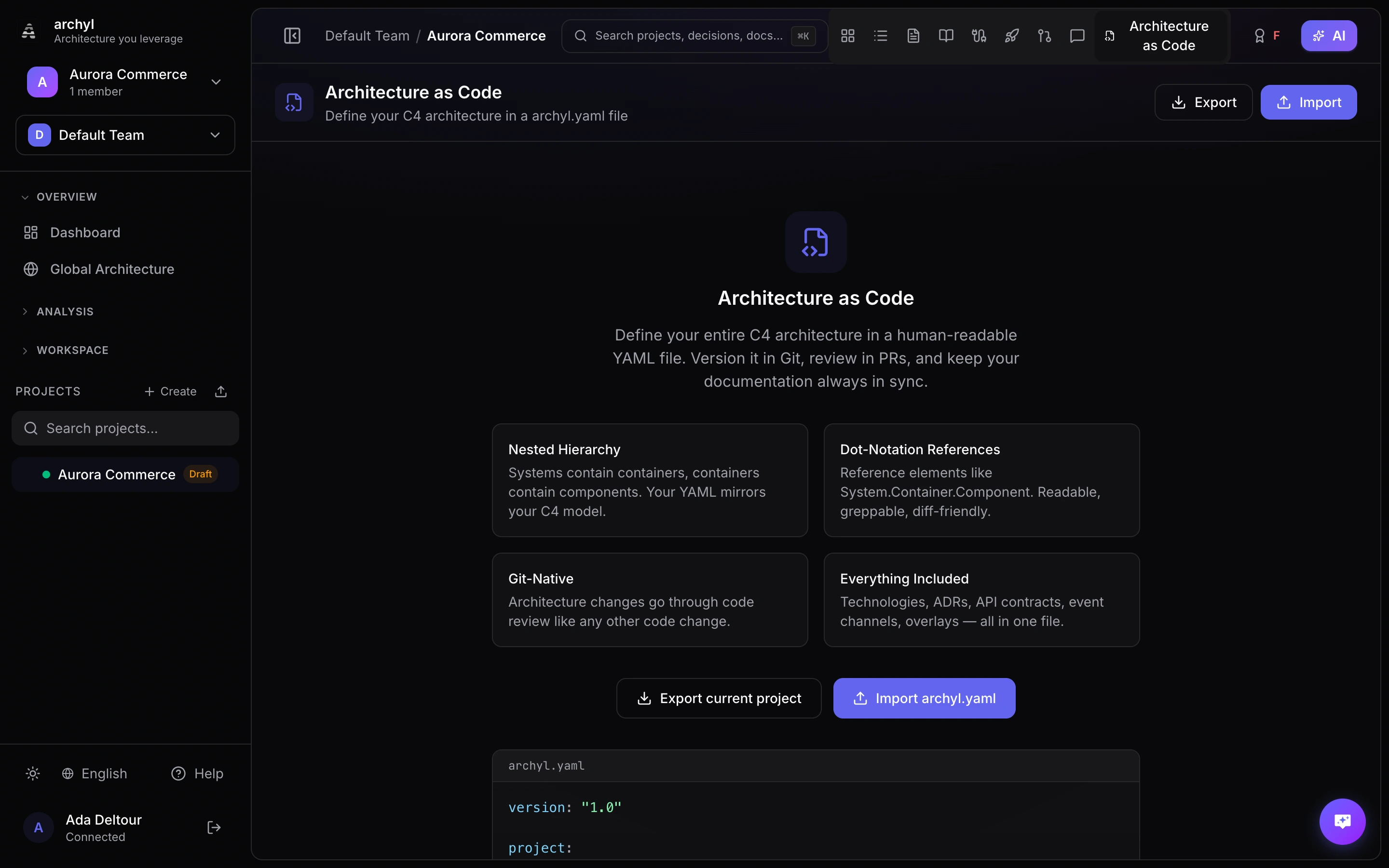
Archyl에서는 전체 C4 아키텍처를 하나의 YAML 파일, archyl.yaml로 정의할 수 있습니다. 이 파일을 리포지토리에 커밋하고 코드와 함께 편집하면, CI/CD가 다이어그램을 자동으로 동기화합니다.
개요
archyl.yaml 파일은 아키텍처를 선언형으로 기술합니다. 다음을 지원합니다.
- 네 가지 C4 레벨 전체(시스템, 컨테이너, 컴포넌트, 코드)
- 모든 요소 간의 관계
- 기술, 환경, 릴리스
- ADR, 문서, API 계약, 이벤트 채널
- 다이어그램 그룹화를 위한 시각적 오버레이
include를 통한 모노레포 지원
직접 작성하거나, 기존 프로젝트에서 내보내거나, 두 방식을 함께 사용할 수 있습니다.
파일 형식
Archyl은 리포지토리 루트에서 다음 이름을 순서대로 찾아 DSL 파일을 읽습니다.
archyl.yaml.archyl.yamlarchyl.yml.archyl.yml
스키마 참조
루트 구조
version: "1.0"

project:
  name: My Platform
  description: E-commerce platform serving 10M users
  tags: [e-commerce, saas]

technologies: [...]
environments: [...]
systems: [...]
relationships: [...]
overlays: [...]
events: [...]
api_contracts: [...]
adrs:
  folder: docs/adrs
  records: [...]
docs:
  folder: docs
  records: [...]
releases: [...]
include: [...]
필수 항목은 version뿐입니다. 나머지 섹션은 모두 선택 사항이므로 필요한 것만 포함하면 됩니다.
시스템 (C4 레벨 1)
시스템은 C4 모델의 최상위 요소입니다.
systems:
  - name: Payment Service
    description: Handles all payment processing
    type: software_system   # person | software_system | external_system
    external: false
    tags: [payments, critical]
    technologies: [Go, PostgreSQL]
    owners:
      teams: [backend-team]
      users: [vincent]
    containers: [...]
| 필드 | 필수 | 설명 |
|---|---|---|
name |
예 | 고유한 시스템 이름 |
description |
아니요 | 이 시스템이 하는 일 |
type |
아니요 | person, software_system 또는 external_system |
external |
아니요 | 외부 시스템 여부 |
tags |
아니요 | 분류용 태그 |
technologies |
아니요 | 사용하는 기술(기술 카탈로그 참조) |
owners |
아니요 | 소유 팀과 소유 사용자 |
containers |
아니요 | 중첩된 컨테이너(C4 레벨 2) |
컨테이너 (C4 레벨 2)
컨테이너는 상위 시스템 안에 중첩됩니다.
systems:
  - name: Payment Service
    containers:
      - name: API Gateway
        description: REST API for payment operations
        type: api
        tags: [rest, public]
        technologies: [Go, Fiber]
        owners:
          teams: [backend-team]
        components: [...]
사용 가능한 컨테이너 유형: web_app, mobile_app, desktop_app, api, database, file_storage, message_queue, cache, service, function, worker, consumer, infrastructure, gateway, library.
모노레포에서 include로 파일을 나눌 때는 parent_system으로 이 컨테이너가 속한 시스템을 지정합니다.
# In services/payments/archyl.yaml
containers:
  - name: Payments API
    parent_system: Payment Service
    type: api
컴포넌트 (C4 레벨 3)
컴포넌트는 상위 컨테이너 안에 중첩됩니다.
containers:
  - name: API Gateway
    components:
      - name: PaymentHandler
        description: HTTP handler for payment endpoints
        type: handler
        file: internal/handler/payment.go
        tags: [http]
        technologies: [Go]
        code: [...]
사용 가능한 컴포넌트 유형: controller, service, repository, handler, middleware, model, util, config, adapter, port, resource, module, job, bundle, plugin, workflow, activity, entity.
코드 요소 (C4 레벨 4)
코드 요소는 상위 컴포넌트 안에 중첩됩니다.
components:
  - name: PaymentHandler
    code:
      - name: ProcessPayment
        description: Handles payment processing requests
        type: function
        language: go
        file: internal/handler/payment.go
        line_start: 42
        line_end: 87
        visibility: public
        signature: "func (h *PaymentHandler) ProcessPayment(c *fiber.Ctx) error"
        methods:
          - name: validate
            signature: "func validate(req PaymentRequest) error"
            return_type: error
            visibility: private
        properties:
          - name: maxRetries
            type: int
            visibility: private
            readonly: true
사용 가능한 코드 요소 유형: class, interface, struct, function, method, enum, constant, type.
관계
관계는 점 표기법으로 중첩 요소를 참조하여 임의의 두 요소를 연결합니다.
relationships:
  - from: Payment Service.API Gateway
    to: Payment Service.Database
    label: Reads/writes payment data
    type: uses
    technologies: [SQL, PostgreSQL]
    tags: [data-access]
    style:
      color: "#6366f1"
      width: 2
      style: solid       # solid | dashed | dotted
      animated: false
점 표기법 형식: System.Container.Component.CodeElement. 필요한 레벨까지만 사용하면 됩니다. Payment Service는 시스템을, Payment Service.API Gateway는 컨테이너를 참조합니다.
사용 가능한 관계 유형: uses, depends_on, calls, reads_from, writes_to, sends_to, receives_from, implements, extends, contains, deployed_on, provisions, publishes_to, consumes_from.
기술
아키텍처 전반에서 사용하는 기술의 카탈로그를 정의합니다.
technologies:
  - name: Go
    description: Primary backend language
    category: programming_language
    icon: go
  - name: PostgreSQL
    description: Main relational database
    category: database
    icon: postgresql
사용 가능한 카테고리: programming_language, framework, database, message_broker, object_storage, transport_protocol, cloud_service, devops_tool, library, runtime, cache, other.
환경
릴리스에 사용할 배포 환경을 정의합니다.
environments:
  - name: Production
    color: "#22c55e"
  - name: Staging
    color: "#f59e0b"
  - name: Development
    color: "#6366f1"
릴리스
환경과 요소별로 버전이 지정된 배포를 추적합니다.
releases:
  - version: "2.4.0"
    status: deployed          # planned | in_progress | deployed | rolled_back | failed
    changelog: "Added payment retry logic and improved error handling"
    environment: Production
    container: Payment Service.API Gateway
    released_at: "2026-03-10T14:00:00Z"
    source: github_action
    source_url: "https://github.com/org/repo/actions/runs/12345"
이벤트 채널
서비스 간 비동기 메시징을 정의합니다.
events:
  - name: PaymentCompleted
    description: Fired when a payment is successfully processed
    direction: produce         # produce | consume
    broker: kafka              # kafka | nats | sqs | rabbitmq | redis | pulsar | custom
    topic: payments.completed
    schema_format: json_schema # json_schema | avro | protobuf | text
    schema: |
      { "type": "object", "properties": { "paymentId": { "type": "string" } } }
    links:
      - Payment Service.API Gateway
API 계약
아키텍처에 API 명세를 연결합니다.
api_contracts:
  - name: Payment API
    description: REST API for payment operations
    type: http                 # http | grpc | graphql | async
    version: "2.0"
    endpoint: /api/v2/payments
    file: docs/openapi.yaml    # path to spec file in repo
    links:
      - Payment Service.API Gateway
file로 리포지토리의 명세 파일을 참조하거나, content로 명세를 직접 인라인으로 작성할 수 있습니다.
아키텍처 결정 기록 (ADR)
adrs:
  folder: docs/adrs            # optional: path to ADR folder in repo
  records:
    - title: Use event-driven architecture for payments
      number: 7
      status: accepted         # proposed | accepted | deprecated | superseded
      date: "2026-02-15"
      context: We need to decouple payment processing from order management
      decision: Use Kafka events for async communication between services
      consequences: Added complexity but improved resilience and scalability
      tags: [architecture, messaging]
      links:
        - Payment Service
문서
docs:
  folder: docs                 # optional: path to docs folder in repo
  records:
    - title: Payment Processing Guide
      file: docs/payments.md   # path to markdown file in repo
      tags: [payments, guide]
      links:
        - Payment Service.API Gateway
file로 리포지토리의 마크다운 파일을 참조하거나, content로 내용을 직접 인라인으로 작성할 수 있습니다.
오버레이
다이어그램에 표시되는 시각적 그룹입니다.
overlays:
  - name: Payment Domain
    description: All payment-related services
    color: "#6366f1"
    level: 2                   # C4 level (1=system, 2=container, 3=component, 4=code)
    elements:
      - Payment Service.API Gateway
      - Payment Service.Database
      - Payment Service.Worker
Include (모노레포 지원)
모노레포에서는 아키텍처를 여러 파일로 나눈 뒤 병합할 수 있습니다.
include:
  - services/payments/archyl.yaml
  - services/orders/archyl.yaml
  - services/users/archyl.yaml
포함되는 각 파일도 같은 스키마를 따릅니다. 컨테이너를 별도 파일에서 정의할 때는 컨테이너에 parent_system을 지정해 소속 시스템을 명시하세요.
전체 예제
version: "1.0"

project:
  name: E-Commerce Platform
  description: Online marketplace with payment processing
  tags: [e-commerce, saas, marketplace]

technologies:
  - name: Go
    category: programming_language
  - name: React
    category: framework
  - name: PostgreSQL
    category: database
  - name: Kafka
    category: message_broker
  - name: Redis
    category: cache

environments:
  - name: Production
    color: "#22c55e"
  - name: Staging
    color: "#f59e0b"

systems:
  - name: Storefront
    description: Customer-facing web application
    type: software_system
    technologies: [React]
    containers:
      - name: Web App
        type: web_app
        technologies: [React]
      - name: BFF
        description: Backend for frontend
        type: api
        technologies: [Go]

  - name: Payment Service
    description: Handles payment processing
    type: software_system
    technologies: [Go, PostgreSQL]
    containers:
      - name: API
        type: api
        technologies: [Go]
        components:
          - name: PaymentHandler
            type: handler
          - name: PaymentService
            type: service
          - name: PaymentRepository
            type: repository
      - name: Database
        type: database
        technologies: [PostgreSQL]
      - name: Worker
        type: worker
        technologies: [Go]

  - name: Stripe
    description: Third-party payment processor
    type: external_system
    external: true

relationships:
  - from: Storefront.Web App
    to: Storefront.BFF
    label: API calls
    type: uses
    technologies: [HTTPS]
  - from: Storefront.BFF
    to: Payment Service.API
    label: Process payments
    type: calls
    technologies: [gRPC]
  - from: Payment Service.API
    to: Payment Service.Database
    label: Reads/writes payment data
    type: uses
    technologies: [SQL]
  - from: Payment Service.API
    to: Stripe
    label: Process charges
    type: calls
    technologies: [HTTPS]
  - from: Payment Service.Worker
    to: Payment Service.Database
    label: Polls for pending payments
    type: reads_from

events:
  - name: PaymentCompleted
    broker: kafka
    topic: payments.completed
    direction: produce
    links:
      - Payment Service.API

overlays:
  - name: Payment Domain
    level: 2
    color: "#6366f1"
    elements:
      - Payment Service.API
      - Payment Service.Database
      - Payment Service.Worker

releases:
  - version: "1.2.0"
    status: deployed
    environment: Production
    container: Payment Service.API
    changelog: Added retry logic for failed charges
    released_at: "2026-03-01T10:00:00Z"
리포지토리에서 동기화
리포지토리에 archyl.yaml이 있으면 Archyl UI에서 바로 동기화할 수 있습니다.
- 프로젝트 설정 > 코드형 아키텍처로 이동합니다
- 지금 동기화를 클릭합니다
Archyl은 리포지토리의 기본 브랜치(또는 DSL 설정에서 지정한 브랜치)에서 파일을 가져와 가져오기를 실행합니다. 이미 존재하는 요소는 업데이트되고, 새 요소는 생성됩니다.
CI/CD 통합
GitHub Action (공식)
공식 archyl-com/actions/sync GitHub Action은 아키텍처를 동기화 상태로 유지하는 가장 쉬운 방법입니다. archyl.yaml을 읽어 Archyl API로 푸시하고, 무엇이 생성되거나 업데이트되었는지 보고합니다.
최소 설정:
name: Sync Architecture
on:
  push:
    branches: [main]
    paths: ['archyl.yaml']
jobs:
  sync:
    runs-on: ubuntu-latest
    steps:
      - uses: actions/checkout@v4
      - uses: archyl-com/actions/sync@v1
        with:
          api-key: ${{ secrets.ARCHYL_API_KEY }}
          project-id: 'your-project-uuid'
요약 출력 사용:
- uses: archyl-com/actions/sync@v1
  id: sync
  with:
    api-key: ${{ secrets.ARCHYL_API_KEY }}
    project-id: 'your-project-uuid'
- run: echo "${{ steps.sync.outputs.summary }}"
사용자 지정 파일 경로(모노레포):
- uses: archyl-com/actions/sync@v1
  with:
    api-key: ${{ secrets.ARCHYL_API_KEY }}
    project-id: 'your-project-uuid'
    file: 'services/payments/archyl.yaml'
자체 호스팅 Archyl:
- uses: archyl-com/actions/sync@v1
  with:
    api-url: 'https://archyl.your-company.com'
    api-key: ${{ secrets.ARCHYL_API_KEY }}
    project-id: 'your-project-uuid'
Action 입력
| 입력 | 필수 | 기본값 | 설명 |
|---|---|---|---|
api-key |
예 | 쓰기 범위가 있는 Archyl API 키 | |
project-id |
예 | Archyl 프로젝트 UUID | |
api-url |
아니요 | https://api.archyl.com |
API 기본 URL(자체 호스팅용) |
file |
아니요 | archyl.yaml |
리포지토리 루트 기준 YAML 파일 경로 |
Action 출력
| 출력 | 설명 |
|---|---|
systems-created |
생성된 시스템 수 |
containers-created |
생성된 컨테이너 수 |
components-created |
생성된 컴포넌트 수 |
relationships-created |
생성된 관계 수 |
summary |
사람이 읽을 수 있는 동기화 결과 요약 |
GitLab CI/CD
sync-architecture:
  stage: deploy
  only:
    changes: [archyl.yaml]
  script:
    - |
      curl -sf -X POST https://your-instance.com/api/v1/projects/${PROJECT_ID}/dsl/ingest \
        -H "X-API-Key: ${ARCHYL_API_KEY}" \
        -H "Content-Type: application/json" \
        -d "{\"content\": $(cat archyl.yaml | jq -Rs .)}"
REST API
어떤 CI/CD 시스템이나 스크립트에서든 DSL 콘텐츠를 푸시할 수 있습니다.
curl -X POST https://your-instance.com/api/v1/projects/{projectId}/dsl/ingest \
  -H "X-API-Key: your-api-key" \
  -H "Content-Type: application/json" \
  -d "{\"content\": $(cat archyl.yaml | jq -Rs .)}"
ingest 엔드포인트는 생성된 항목의 요약을 반환합니다.
{
  "source": "api",
  "import": {
    "systemsCreated": 2,
    "containersCreated": 5,
    "componentsCreated": 12,
    "codeElementsCreated": 0,
    "relationshipsCreated": 8,
    "overlaysCreated": 1,
    "technologiesCreated": 4,
    "adrsCreated": 0,
    "docsCreated": 0,
    "eventsCreated": 1,
    "apiContractsCreated": 0,
    "environmentsCreated": 2,
    "releasesCreated": 1
  }
}
YAML로 내보내기
기존 프로젝트는 무엇이든 archyl.yaml 파일로 내보낼 수 있습니다.
- 프로젝트를 엽니다
- 툴바에서 내보내기를 클릭합니다
- **YAML (Architecture as Code)**를 선택합니다
리포지토리에 커밋할 수 있는 완전한 archyl.yaml이 생성됩니다. 기존 프로젝트나 AI가 발견한 아키텍처에서 파일을 처음 만들 때 유용합니다.
API로도 내보낼 수 있습니다.
curl -H "X-API-Key: your-api-key" \
  https://your-instance.com/api/v1/projects/{projectId}/dsl/export \
  -o archyl.yaml
IDE 지원을 위한 JSON Schema
Archyl은 archyl.yaml 파일용 JSON Schema를 제공하므로 편집기에서 자동 완성과 검증을 사용할 수 있습니다. 스키마는 다음 주소에서 제공됩니다.
https://your-instance.com/api/v1/dsl/schema
VS Code
스키마 검증을 활성화하려면 archyl.yaml에 다음을 추가하세요.
# yaml-language-server: $schema=https://your-instance.com/api/v1/dsl/schema
version: "1.0"
또는 VS Code 설정에서 전역으로 구성할 수 있습니다.
{
  "yaml.schemas": {
    "https://your-instance.com/api/v1/dsl/schema": ["archyl.yaml", ".archyl.yaml"]
  }
}
이미지 및 PDF 내보내기
Archyl은 프레젠테이션과 문서에 사용할 수 있도록 다이어그램을 이미지로 내보내는 기능도 지원합니다.
사용 가능한 형식
| 형식 | 적합한 용도 |
|---|---|
| PNG | 프레젠테이션, 문서, 채팅 공유 |
| SVG | 디자인 도구, 웹 임베딩, 인쇄 |
| 공식 문서, 보관 |
내보내기 방법
- 내보낼 C4 레벨로 이동합니다
- 툴바에서 내보내기를 클릭합니다
- 형식을 선택합니다 (PNG, SVG 또는 PDF)
- 옵션을 구성합니다 (배경, 품질, 뷰포트)
- 내보내기를 클릭합니다
모든 레벨 내보내기를 체크하면 C4 레벨마다 별도의 파일이 생성됩니다.
내보내기 옵션
- 배경: 어두운 캔버스 배경을 포함하거나 투명하게 내보냅니다
- 품질 (PNG만 해당): 표준, 고화질 또는 인쇄 해상도
- 뷰포트: 콘텐츠 맞춤, 여백 포함 또는 현재 뷰 내보내기
프로젝트 가져오기
여러 형식에서 가져와 새 프로젝트를 만들 수 있습니다. Archyl은 다섯 가지 가져오기 소스를 지원합니다.
| 형식 | 파일 유형 | 소스 도구 |
|---|---|---|
| Archyl YAML | .yaml / .yml |
Archyl 네이티브 형식 |
| Structurizr DSL | .dsl |
Structurizr |
| LikeC4 | .c4 / .likec4 |
LikeC4 |
| IcePanel JSON | .json |
IcePanel |
| Backstage JSON | .json |
Backstage |
가져오기 방법
- 프로젝트 목록에서 프로젝트 가져오기를 클릭합니다
- 소스 형식 탭을 선택합니다 (Archyl YAML, Structurizr DSL, LikeC4, IcePanel 또는 Backstage)
- 파일을 업로드하거나 내용을 붙여넣습니다
- 검증을 클릭하여 생성될 내용을 미리 확인합니다
- 프로젝트 생성을 클릭합니다
전체 과정은 1분도 걸리지 않습니다. 모든 시스템, 컨테이너, 컴포넌트, 관계, 기술 및 태그를 자동으로 가져옵니다.
프로젝트 이름과 설명
프로젝트를 만들려면 이름이 필요하며, 형식마다 그 이름을 담는 위치가 다릅니다. 이름이 없는 것이 가져오기가 거부되는 가장 흔한 원인입니다.
| 형식 | 프로젝트 이름 | 프로젝트 설명 |
|---|---|---|
| Archyl YAML | project.name — 필수 |
project.description |
| Structurizr DSL | workspace 이름 — 필수 | workspace 설명 |
| LikeC4 | 첫 번째 최상위 요소, 없으면 Imported LikeC4 Project |
사용할 수 없음 |
| IcePanel JSON | domain 객체, 없으면 Imported IcePanel Project |
사용할 수 없음 |
| Backstage JSON | 항상 Imported Backstage Catalog |
사용할 수 없음 |
이 검사에서 실패할 수 있는 형식은 Archyl YAML과 Structurizr DSL뿐입니다. 다른 형식은 항상 생성된 이름으로 대체되며, 가져온 후 변경할 수 있습니다.
Structurizr에서 이름과 설명은 workspace 헤더에 있는 두 개의 선택적 문자열입니다.
workspace "My Platform" "Microservices architecture" {
    model {
        user = person "User"
        platform = softwareSystem "My Platform" {
            api = container "API" "REST API" "Go"
        }
        user -> api "Uses"
    }
}
이름이 없는 workspace { ... }는 올바르게 파싱되지만 프로젝트를 만들 수 없습니다. Archyl은 이를 거부하고 workspace에 이름을 지정하도록 요청합니다. 기존 프로젝트로 가져올 때는 이 요건이 없습니다. 프로젝트에 이미 이름이 있으므로 workspace 이름은 무시됩니다.
Structurizr DSL 가져오기
Archyl은 Structurizr의 .dsl 워크스페이스 파일을 파싱하여 전체 C4 모델을 추출합니다.
person,softwareSystem,container,component요소- 설명과 기술을 포함한 모든
->관계 - 태그를 통한 외부 시스템 감지
- 위치 인수에서 기술 추출
- 그룹을 태그로 매핑
뷰, 스타일, 테마, 배포 노드는 건너뜁니다(Archyl에는 자체 시각적 레이어가 있습니다).
workspace의 이름과 설명이 프로젝트의 이름과 설명이 됩니다. 위의 프로젝트 이름과 설명 섹션을 참조하세요. 이름이 없는 workspace는 기존 프로젝트로 가져올 수 있지만 새 프로젝트를 만들 수는 없습니다.
여러 파일로 나뉜 워크스페이스 (!include)
!include systems/payments.dsl 처럼 여러 파일로 나뉜 워크스페이스는 단일 파일로 가져올 수 없습니다. 포함된 파일이 없어 해석할 수 없기 때문입니다. 대신 Structurizr DSL 탭에서 워크스페이스 전체를 .zip 으로 업로드하세요. 아카이브의 파일이 풀리고 모든 !include 가 그 파일들을 기준으로 해석됩니다.
- 진입점은 아카이브에
workspace.dsl이 있으면 그 파일이고, 없으면 가장 얕은.dsl파일입니다. 어떤 파일을 사용했는지 Archyl이 알려줍니다. - 경로는 include를 작성한 파일 기준으로 해석되므로 중첩된 include도 동작합니다.
- 디렉터리를 포함하면 그 바로 아래의 모든
.dsl을 이름순으로 가져옵니다. - include 순환은 중단하고 보고하며, 가져오기 자체를 실패시키지 않습니다.
- 원격 대상(
!include https://…)은 거부되고, 아카이브 밖을 가리키는 경로는 건너뜁니다.
해석하지 못한 항목은 가져오기 결과의 경고가 됩니다. 워크스페이스의 나머지는 그대로 들어옵니다.
아카이브 제한:
| 제한 | 값 |
|---|---|
| 아카이브 크기 | 10 MiB |
| 아카이브 내 파일 수 | 500 |
| 압축 해제 후 전체 크기 | 50 MiB |
| 파일 하나의 크기 | 5 MiB (더 큰 파일은 경고와 함께 건너뜁니다) |
| include 중첩 | 10단계 |
.dsl, .md, .json, .yaml, .yml, .txt 파일만 유지되며, 아카이브의 나머지 파일은 무시됩니다.
API로는 아카이브를 multipart form data의 file 필드로 보내고, 선택적으로 entry 필드에 진입점을 지정합니다. POST /api/v1/dsl/validate-archive 는 아카이브를 검사하고, POST /api/v1/projects/{id}/dsl/import-archive 는 프로젝트로 가져오며, POST /api/v1/dsl/import-project-archive 는 아카이브로 새 프로젝트를 만듭니다. import_dsl MCP 도구와 리포지토리 동기화는 단일 파일만 읽으며 !include 를 해석하지 않습니다.
LikeC4 가져오기
Archyl은 LikeC4 파일을 가져오는 최초의 도구입니다. 가져오기 도구는 LikeC4 고유의 기능을 처리합니다.
specification블록의 사용자 정의 요소 종류를 C4 레벨에 매핑- 중첩된 요소 계층 구조를 시스템, 컨테이너, 컴포넌트로 해석
technology:및description:속성(콜론 구문 유무와 관계없이)#hashtag태그를 표준 태그로 변환- 경계 분류를 위한
#external태그 감지 - 여러
model블록을 자동으로 병합 - 작은따옴표 문자열과 삼중 따옴표 문자열 지원
IcePanel JSON 가져오기
IcePanel의 JSON 내보내기 형식을 완전히 지원합니다.
system,actor,app,store,component객체 유형을 C4 요소에 매핑- 외부 시스템 분류를 위한
external: true필드 modelConnections를 관계에 매핑tagIds를tags배열의 태그 이름으로 해석domain객체를 프로젝트 이름으로 사용
Backstage 가져오기
Archyl은 Backstage의 /api/catalog/entities 엔드포인트가 반환하는 Software Catalog JSON을 가져옵니다.
System엔티티를 Archyl 시스템에 매핑(네임스페이스 간 이름 충돌은 자동으로 구분)Component와Resource엔티티는 소속 시스템 아래의 컨테이너로 통합(spec.system또는partOf관계 기준)- 상위 시스템이 없는 Component/Resource는 합성된 Uncategorized 시스템 아래에 그룹화
Resource유형을 Archyl 컨테이너 유형으로 매핑:s3-bucket→file_storage,rds-instance,dynamo-db-table,valkey-cluster,opensearch-domain→database,kafka-topic,sqs-queue→message_queue,repository→library, 그 외 모두 →infrastructureComponent유형 매핑:service→service,cronworkflow→worker,website→web_app,library→libraryAPI엔티티는 인라인spec.definition(OpenAPI / gRPC / GraphQL / AsyncAPI)을 콘텐츠로 보존한 API 계약으로 가져오며, 제공자/소비자 컴포넌트에 연결dependsOn,consumesApi,producesTo,consumesFrom,versionedIn(및 각각의 역방향 관계)을 Archyl 관계로 변환metadata.namespace,spec.lifecycle,spec.type을 태그로 노출User와Group엔티티는 건너뜀 — Backstage의 사람/팀 그래프는 C4 개념이 아닙니다
카탈로그를 내보내려면 다음을 실행합니다.
curl -H "Authorization: Bearer $BACKSTAGE_TOKEN" \
  https://backstage.your-company.com/api/catalog/entities \
  -o entities.json
그런 다음 가져오기 대화상자의 Backstage 탭에 entities.json을 끌어다 놓습니다. 대규모 카탈로그의 리소스 목록은 수천 개의 컨테이너를 만들 수 있으므로, 결과를 검토하고 필요 없는 항목은 삭제하세요.
MCP를 통한 가져오기 (AI 에이전트)
동일한 가져오기 기능을 import_dsl MCP 도구로도 사용할 수 있습니다.
Use the import_dsl tool with:
- projectId: your project UUID
- content: the DSL/JSON content
- format: "archyl", "structurizr", "likec4", "icepanel", or "backstage"
이를 통해 AI 코딩 에이전트(Claude Code, Cursor, Windsurf)가 프로그래밍 방식으로 아키텍처 파일을 가져올 수 있습니다.
기존 프로젝트로 가져오기
새 프로젝트를 만드는 것뿐 아니라 기존 프로젝트로 가져올 수도 있습니다.
- 프로젝트를 엽니다
- Architecture as Code로 이동합니다
- 가져오기를 클릭합니다
- 형식을 선택하고 업로드합니다
이미 존재하는 요소는 업데이트되고, 새 요소는 생성됩니다.
다음 단계
- API 개요 — DSL 엔드포인트를 포함한 전체 API 참조
- 공유 및 임베딩 — 라이브 다이어그램 공유
- 릴리스 관리 — YAML에서 배포 추적
- Webhook 알림 — 아키텍처가 변경되면 알림 받기