Review Your Agent While It Works
At 10:40 you start a managed run on the billing service: "Document how to set up and run the service locally." At 11:02 a pull request arrives with a new docs/setup.md. It's decent. Line 12 tells new hires to run go build ./..., which skips the build tags the service needs, so their first build fails in a way the doc never explains. And somewhere around minute six, the agent decided the Docker section of the README was out of date and rewrote it. Nobody asked for that.
None of it is hard to fix in review. What review can't give back is the twenty minutes in between. The agent made those choices early, with nobody to check them, and built everything after on top of them. The fix is then a second run that starts from nothing, reads the same files again, and opens a second pull request.
That is how Archyl's managed agent runs worked until now. The run page had an event feed and a steering box, so you could follow the tool calls if you kept the tab open, on a laptop or from your phone. But what the agent intended, and what it had written so far, you pieced together from tool-call payloads or learned from the pull request. For a nightly dependency audit, that's fine. For a change you're going to review anyway, it puts the review at the point where it costs the most.
Runs now have a review loop. Here's what changed:
| In the loop | Before | Now |
|---|---|---|
| What the agent intends | Inferred from its tool calls | A plan you can edit before anything changes |
| A call it can't make alone | It decides on its own | It asks, with suggested answers |
| What it wrote | The pull request, at the end | Changes, file by file, as it writes |
| Feedback on a line | A PR comment, after the run | A comment the agent reads at its next step |
| Feedback after the run | A new run from scratch, and a new PR | Continue, on the same branch and PR |
The rest of this post runs the same task again, the new way, in the order you'd live it. The task is an example; every message quoted below is in the format the agent really receives.
The plan comes first
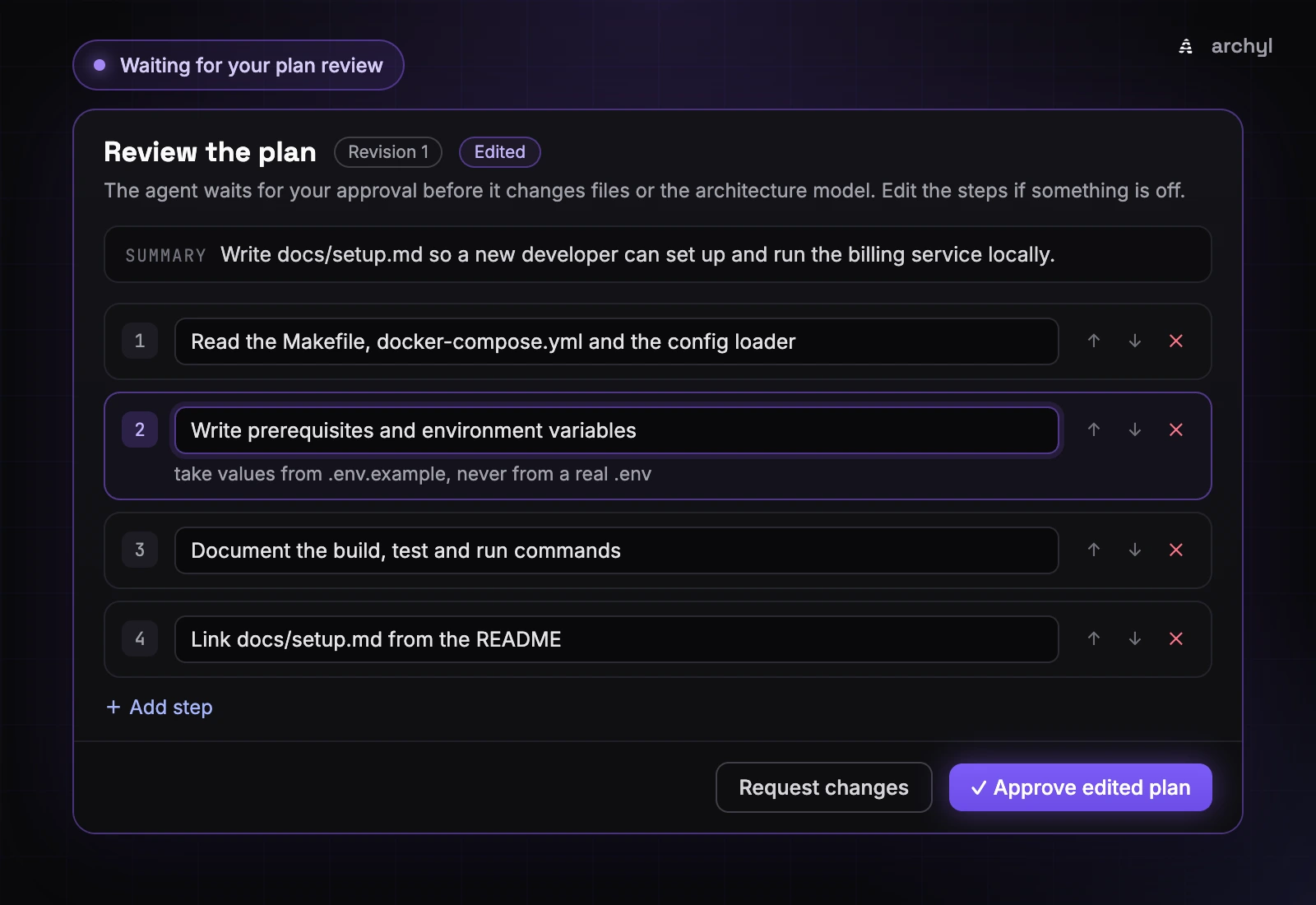
Before it touches a file, the agent is asked to call propose_plan with a one-sentence summary and a few concrete steps. The prompt asks for 3 to 8, and the tool refuses more than 12, so a plan stays readable at a glance. The Plan panel at the top of the run page turns it into a checklist. As the agent works, it marks each step In progress, Done or Skipped, sometimes with a short note, and the panel shows the step it's on and the progress (2/4).
By default the plan is shared and the agent starts right away. Turn on Review the plan first, under Coordination in the agent profile, and it waits for you instead. The panel switches to review mode, where you can rename steps, add details, and add, remove or reorder steps.
For the setup doc, the agent proposed five steps. The fourth was "Update the Docker section of the README", the rewrite nobody asked for. You remove it and add a detail to step 2, and the button that read Approve plan now reads Approve edited plan. This is what the agent gets back:
The plan was approved with edits. Follow this plan:
1. Read the Makefile, docker-compose.yml and the config loader
2. Write prerequisites and environment variables — take values from .env.example, never from a real .env
3. Document the build, test and run commands
4. Link docs/setup.md from the README
Call update_plan when each step starts and when it is done or skipped.
Your edited version is the plan the agent follows, and the one the checklist tracks. When a plan is wrong rather than slightly off, Request changes sends feedback instead. The agent revises it and proposes a new revision, and earlier revisions stay in the feed, so you can see what your feedback changed.
Until a plan is approved, the agent can't write files, change the architecture model through Archyl's tools, or push to a repository through a connector. That isn't a line in the prompt it could talk itself past. The calls are refused, and the agent reads:
changes are refused until your plan is approved: call propose_plan and wait for the review
If nobody reviews the plan within an hour, the run fails, having changed nothing. A profile that asks for review doesn't get to skip it because nobody showed up.
Questions, when a person has to decide
Some calls the agent shouldn't make alone: an ambiguous requirement, a trade-off with no clear winner, something destructive. For those it has ask_human. Its instructions say never to ask for something it can look up, and it gets at most 5 questions per run, so it can't hand the work back one question at a time.
Halfway through step 2, the agent finds a STAGING_DATABASE_URL in the config. Documenting it would help, except that staging needs VPN access new hires don't get in their first week. Nothing in the repository says that, so it asks.
The question appears above the feed, with Suggested answers when the agent offers some ("Leave staging out", "Mention it, with a note about VPN access"), and a box for your own answer (Cmd/Ctrl + Enter sends it). Anyone who can edit the project can answer, and the feed records who did. The agent reads The human answered: Leave staging out and carries on.
A question nobody answers within an hour doesn't fail the run. The agent continues on its own judgment and states the assumption it made in its outcome. That's the opposite of the plan, and the difference is what's at stake: an unreviewed plan means nothing was agreed, while an unanswered question is one more decision of the kind the agent makes all run long.
What waiting costs
While the agent waits for a plan review or an answer, the run shows Waiting for you, and the run list files it under Needs you. A banner above the feed says what it's waiting for, Waiting for your plan review or The agent has a question, and takes you there.
The wait doesn't count against the run's time limit. Its deadline moves back by the time spent waiting, so a run with a 30-minute limit that waited 20 minutes for you still gets 30 minutes of work. It does keep its concurrency seat. A run in Awaiting approval hasn't started yet, so it holds nothing, but a waiting run is mid-conversation with its workspace open, ready to resume when your reply reaches it.
The diff, as it's written
The run page now has two views: Activity, the event feed, and Changes. Changes lists every file the agent writes, as it writes it, with a status (Added, Modified or Blocked) and the lines added and removed, per file and for the whole run. Select a file to see what each write changed (Edit 2 of 3), not only the final state.
The Guard, the conformance check on every file write that now runs inside the worker, shows up here too. A write it refused is Blocked: the diff shows what the agent tried to write, with the rule it broke, even though that content never reached the file. A write it only flagged goes through, with a warning on the file. A refusal you used to find in a tool result is now a diff you can read.
Two limits: long diffs are cut after 600 lines, and files over 128 KB are listed without a diff.
A comment on line 12
Back to go build ./.... You don't have to wait for the pull request. In Changes, click the line number, write the comment, and Send to agent (Cmd/Ctrl + Enter). At its next step the agent receives it as a code review comment, with the file, the line and its content:
[Review comment from a human operator on docs/setup.md, line 12 of the file as you wrote it]
> go build ./...
Use the make target instead, it sets the build tags.
Address the comment in that file, then carry on with your plan.
It fixes the line, then goes back to its step. Under the line, the comment reads Queued until the agent picks it up, then Delivered. It also appears in Activity, and each file in the list shows how many comments it has. The fix, when it comes, arrives as the file's next edit, so the diff where you left the comment is also where you check it.
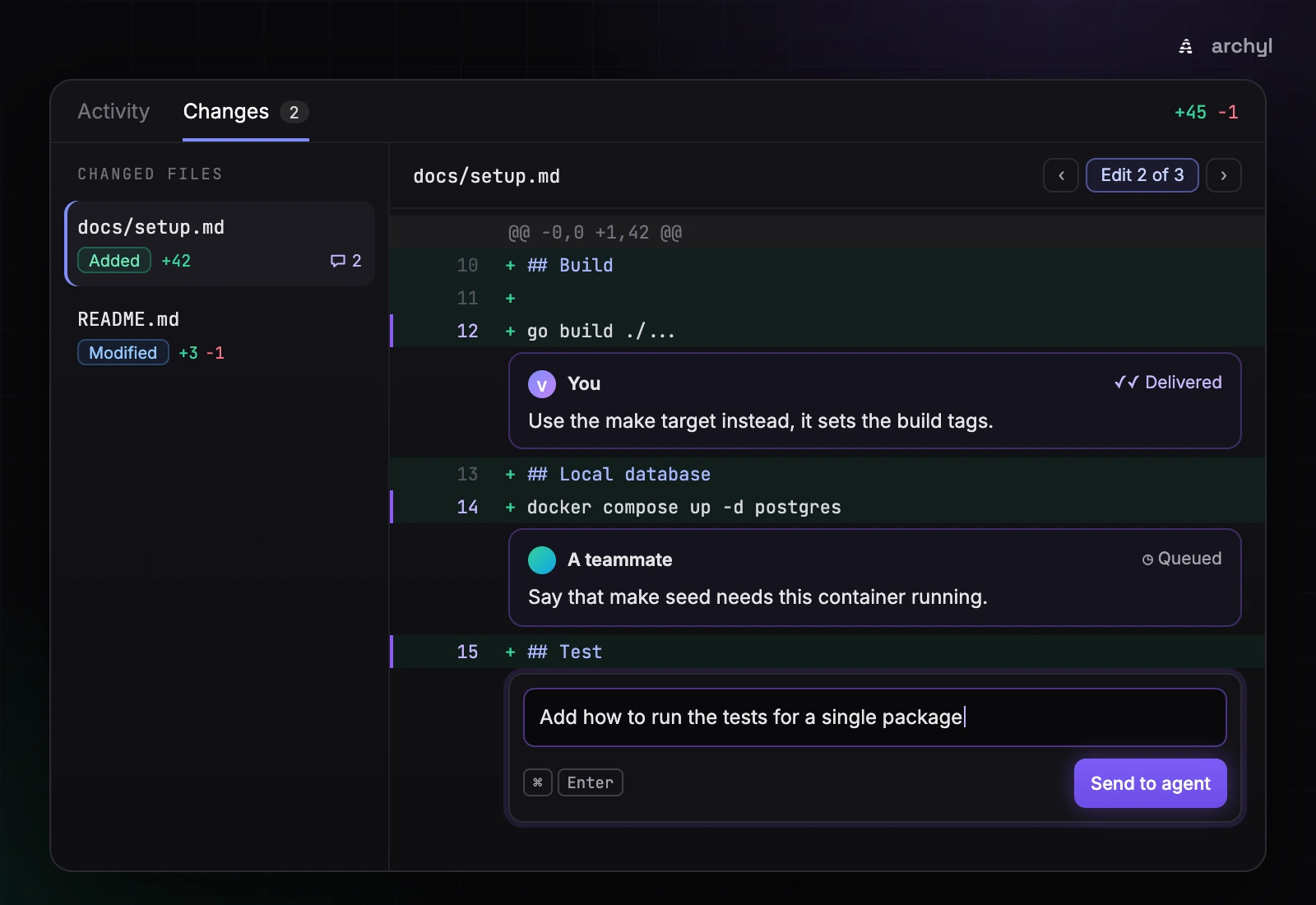
You can comment on added, unchanged and removed lines. A comment on a removed line reaches the agent as a comment on "the lines you removed", which is how you tell it to put a check back. Comments are accepted while the agent works or waits for you, and a waiting agent reads them when it resumes. A comment still Queued when the run ends shows Not delivered. Writes the Guard blocked take no comments.
The steering box is still there, for redirecting the agent in free text without cancelling the run ("skip the migration, focus on the handler"). A line comment is the same mechanism pinned to a line. What it saves you is the preamble: "in docs/setup.md, where you wrote go build" is already in the message.
The run that had nothing to review
While building Changes, I asked a run to add documentation to one of our Git repositories, and watched the view stay empty. No files, no diff, nothing to comment on.
The project had no linked repository, so Archyl hadn't cloned anything. What the run did have was a GitHub connector, and the agent did the reasonable thing with the tools in front of it: it wrote the files straight to GitHub with the connector's push_files tool. Nothing went through a workspace. So nothing went through the Guard, nothing appeared in Changes, and the review loop I was building had nothing to review.
The agent now works in a workspace either way:
- A repository is linked to the project. Archyl clones it when the run starts, as before.
- No linked repository, but a GitHub connector is attached. The agent clones the repository the task is about itself, by calling
open_repositorywith the connector's credentials, before it touches any file. This only works with GitHub's hosted MCP server (api.githubcopilot.com), and the token needs access to the repository.
Once a workspace is open, the connector tools that write to a repository (push_files, create_or_update_file, delete_file, create_pull_request) are refused, and the agent reads:
a repository workspace is open: change files with write_file and edit_file instead. Archyl commits your changes and opens the pull request when the run ends.
That rule is what puts every change through the Guard, into Changes, and into a single pull request.
When the run ends
Archyl commits the workspace changes on archyl/agent-<run id>, using the first eight characters of the run's ID, and opens a pull request against the branch the clone started from. The link sits at the top of Changes (Open pull request) and in the result. How the run ended decides what gets published:
| How the run ends | What Archyl publishes |
|---|---|
| Succeeded | A pull request |
| Failed, or stopped by its time or cost limit | A draft pull request that says why the run stopped |
| Cancelled | Nothing |
On GitLab, the draft is a Draft: merge request. On Bitbucket, the branch is pushed without a pull request. A run that changed no files publishes nothing.
Your comments become the next run
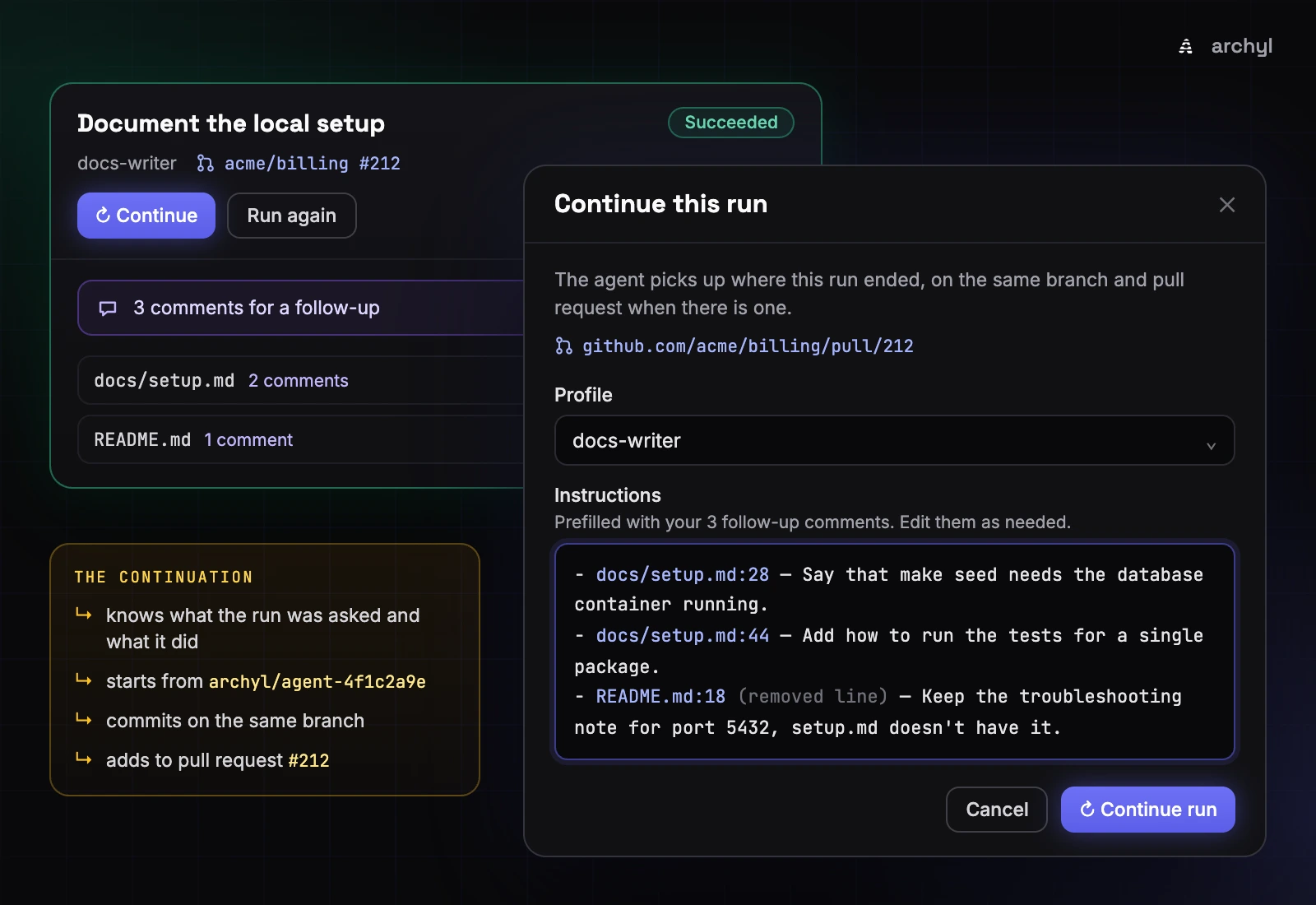
The review doesn't stop when the run does. The pull request is open, and you're reading the final diff in Changes. A comment on an ended run has no agent to reach, so it becomes a note for the next one: Add to follow-up keeps it in your browser. A bar above the files counts them (3 comments for a follow-up) and offers Continue with them.
Every ended run, whatever its outcome, offers two buttons. Run again opens the start dialog with the same task and profile, for a fresh run from scratch: the right choice when the first attempt went somewhere you don't want to build on. Continue starts a new run that picks up this one's work, with its instructions prefilled from your follow-up comments, if you left any, one per line:
- docs/setup.md:28 — Say that make seed needs the database container running.
- docs/setup.md:44 — Add how to run the tests for a single package.
- README.md:18 (removed line) — Keep the troubleshooting note for port 5432, setup.md doesn't have it.
Edit them as you like. The profile defaults to the run's, and you can pick connectors.
Same branch, same pull request
A continuation is more than a fresh run with a longer prompt. It starts from the branch the previous run published, commits on it, and adds its changes to the same pull request instead of opening another. If the previous run opened its repository through the GitHub connector, the continuation reopens it on that branch before the agent starts.
The agent is also told what it's building on. The previous task, what that run did (its outcome summary, or why it stopped), and where its work lives all go at the top of its prompt (the IDs, URL and summary are examples):
# Continuing a previous run
This run continues the work of run `4f1c2a9e-7b3d-4e0a-9c6f-2d8b1a5e3c70`. Build on what it did rather than starting over.

## What it was asked
Document how to set up and run the service locally.

## What it did
Added docs/setup.md with prerequisites, environment variables and the make targets, and linked it from the README. Left the staging database out, as answered.

Its changes are on the branch `archyl/agent-4f1c2a9e`, which your workspace starts from. Your changes are added to its pull request: https://github.com/acme/billing/pull/212. If the workspace could not start from that branch, the run feed says so and your changes go to a new pull request.

The task below is what the person wants now, often review comments on that work: address each of them.
Reviewers see one pull request grow, not a trail of them. GitHub's Copilot cloud agent handles follow-ups the same way: you mention @copilot in a comment on a pull request, and by default it pushes commits to that pull request's branch (GitHub Docs). One pull request per piece of work is the right shape, and continuations keep to it.
What to expect at the edges:
- The branch is gone, merged and deleted for instance. The continuation starts from the default branch and opens a new pull request, and an amber line in the feed says so: "Could not check out the previous run's branch archyl/agent-4f1c2a9e. This run starts from the default branch and will open a new pull request."
- The pull request is a draft. It stays a draft. Mark it ready for review once the work is done.
- Only agent branches. Archyl continues on branches its agents created, the ones under
archyl/, and never commits on a branch a person made.
The two runs link to each other: the new one shows Continues run, the previous one Continued in. A run still in progress can't be continued. Comment on its lines instead.
The continuation also keeps its architecture context. Its work session is opened for the previous task plus the follow-up, not the follow-up alone, so it finds the same architecture elements and memory as the run it continues. That matters more than it sounds. "Say that make seed needs the database container running" names no service at all, and a session opened on that line alone would have little to match.
What it doesn't do
The worker has no shell. It reads, writes, edits, lists and searches files, but it can't build the project or run the tests. In this example it can read the Makefile, not run make build to check that the doc is right. A clean diff is not a passing build, and CI still does that job.
A line comment is guidance, not a gate. There's no resolved state, and nothing checks that the agent addressed a comment. You see its next edit in the diff, and you judge it.
Follow-up notes live in one browser. Until you continue the run, your teammates don't see the comments you added to a follow-up. Comments sent to a live agent are different: they're in the feed for everyone.
Plan review assumes someone is there. It's a per-profile setting, off by default, and every run on that profile honors it, scheduled runs included. A 3 a.m. run on a profile with review turned on waits an hour, then fails without changing anything. Questions wait an hour too, then the agent decides alone.
The connector clone is GitHub-only. open_repository works with GitHub's hosted MCP server. For any other host, link the repository to the project.
Where to start
Pick a small task you'd review anyway, and run it on a profile with Review the plan first turned on. Keep the run page open. Edit the plan before you approve it, even if all you do is remove the step you wouldn't have asked for. In Changes, comment on the first line you'd have flagged in the pull request, and watch it go from Queued to Delivered. When the run ends, leave the rest as follow-up comments and press Continue.
Leave plan review off on the profiles your schedules use, unless someone will be awake to review.
Plans, questions, the live diff, line comments and continuations are part of managed agent runs in Archyl. Every setting and label named above is in the managed agent runs docs. Related reading: managed agents now answer to the harness, for the Guard and the work sessions this builds on, and the launch of managed agent runs.