AI Pay-as-You-Go: Keep Working When a Quota Runs Out
It's the third week of the month. Your team connects two new repositories and runs AI discovery on both, someone generates flows for the checkout path, and a managed agent spends the afternoon documenting how to run the billing service locally. On Thursday morning, a developer asks the architecture chat which containers still read from the old ledger database, and gets a quota message instead of an answer.
Until today, that was the end of it. Every paid plan includes monthly AI quotas counted in requests: AI discoveries, chat requests, flow generations, managed agent runs. When one ran out, the feature behind it stopped until the next billing period. That tended to happen in the busiest weeks, mid-sprint, when the team was using Archyl the most.
On Business and Scale, the organization owner can now turn on AI pay-as-you-go. Once a quota is used up, requests keep running, and only the tokens used beyond the quota are billed, per token, on your next invoice. Requests within your quotas stay included at no extra cost, exactly as before.
What it costs
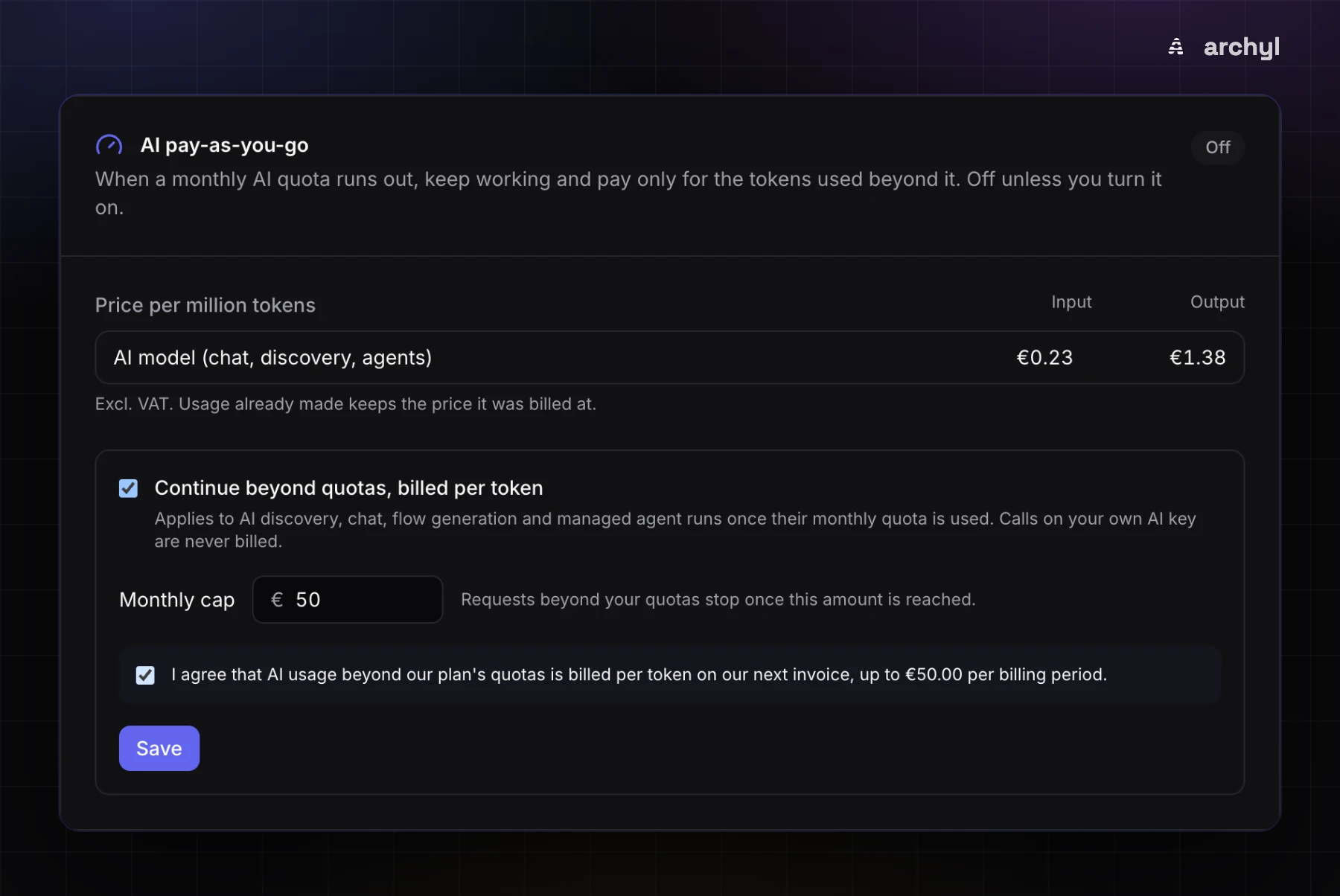
Prices are per million tokens, excluding VAT.
| Usage | Input | Output |
|---|---|---|
| AI requests (chat, discovery, flow generation, agents) | €0.23 | €1.38 |
To put a number on it: a typical AI chat answer reads about 6,000 tokens and writes about 800. That's 6,000 × €0.23/1M plus 800 × €1.38/1M, roughly €0.0025 per answer. At that size, a thousand chat answers beyond the quota come to about €2.50. Discovery and agent runs read far more than a chat answer, so they cost more per request. The usage card described below shows what they actually cost you.
The price is fixed when the request is made. If prices change later, usage you've already made keeps the price it was billed at.
Nothing is billed unless the owner opts in
We wanted a quota to stop blocking the team without anyone getting a bill they didn't agree to. So the setting has several safeguards:
- Off by default. Nothing changes for any organization until someone turns it on.
- Owner only. Only the organization owner can turn it on or change it. Anyone else who opens the card is told that only the owner can change it.
- Explicit agreement. Turning it on requires ticking a box that says, in so many words, that usage beyond the plan's quotas is billed per token on the next invoice, up to your cap.
- A monthly cap you set, anywhere from €5 to €10,000. The default is €50. When pay-as-you-go spend reaches the cap, requests beyond the quotas stop again until the next billing period, or until the owner raises the cap. Requests still within a quota are unaffected.
- Your own AI key is never billed by us. If your organization routes AI through its own provider, those calls are paid to your provider directly. Archyl doesn't bill them, and they're shown separately.
Pay-as-you-go isn't available on the free Developer plan. Plan and seat prices are unchanged.
Every token, three ways
A per-token bill you can't check is a bill you have to take on trust. So the usage is visible in three places.
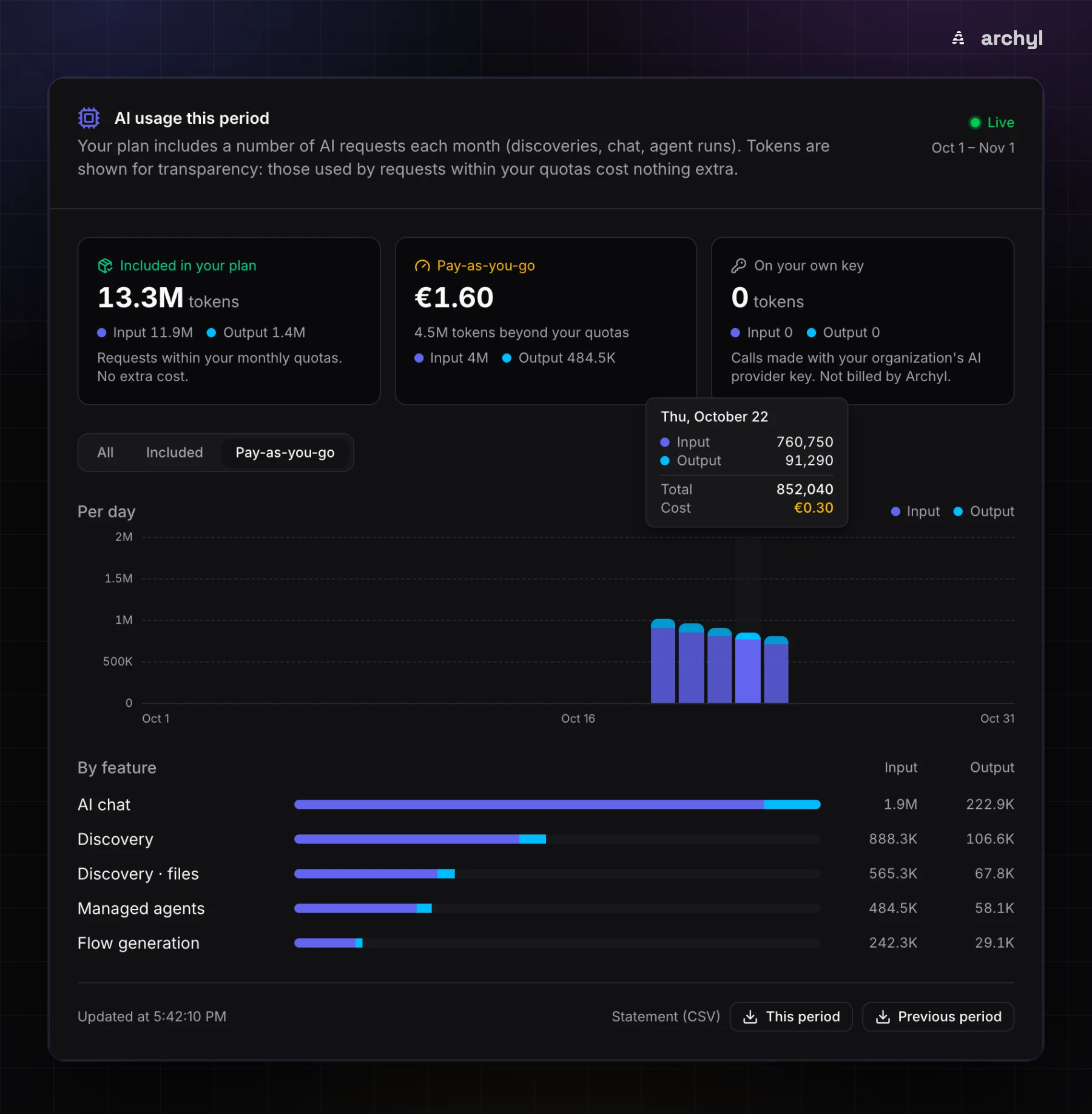
A live usage card in Organization settings > Subscription. It splits the period's tokens into Included in your plan, Pay-as-you-go (with the euro amount so far) and On your own key, with input and output tokens shown separately. A per-day chart shows the trend, and hovering a day gives its date, input, output, total and cost. Below it is a breakdown by feature, and a filter shows each share on its own.
A CSV statement for the current or previous billing period, one row per day, feature and billing type. The rows below are illustrative, but the columns are the real ones:
date,feature,billed_as,calls,input_tokens,output_tokens,cost_eur
2026-10-21,chat,included,212,1268000,171000,
2026-10-22,chat,pay_as_you_go,48,288000,38400,0.119232
2026-10-22,file,pay_as_you_go,130,2470000,312000,0.998660
billed_as is included, pay_as_you_go or own_key. Only pay-as-you-go rows carry a cost.
A summary on the invoice itself. The pay-as-you-go line on your monthly invoice comes with the tokens behind it, so whoever handles invoices can check the amount without opening Archyl. With example figures:
AI pay-as-you-go: AI usage beyond the plan quotas, 1 Oct 2026 to 1 Nov 2026.
- AI requests: 4,210,000 input tokens x EUR 0.23/1M + 560,000 output tokens x EUR 1.38/1M = EUR 1.7411
Billed: 17,411 units x EUR 0.0001 = EUR 1.7411 excl. VAT (each report to billing is rounded to EUR 0.0001).
Day-by-day statement: Archyl, Organization settings > Subscription.
How to turn it on
- Sign in as the organization owner and open Organization settings > Subscription.
- Find the AI pay-as-you-go card. It lists the current prices.
- Turn on Continue beyond quotas, billed per token.
- Set a Monthly cap, between €5 and €10,000. It starts at €50.
- Tick the agreement and click Save.
If a quota runs out before you've set it up, the quota message offers a shortcut, Keep going with AI pay-as-you-go, that takes you to the card. The pricing page has a pay-as-you-go section with the same prices, for anyone weighing it up before they need it.
FAQ
What counts as "beyond the quota"? Each quota is counted in requests, as before. Pay-as-you-go applies to AI discovery, AI chat, flow generation and managed agent runs once that feature's monthly quota is used up for the period. Until then, requests are included and nothing is billed per token. The tokens of included requests still appear on the usage card, under Included in your plan, so you can see what your plan covers.
What happens when we reach the cap? Requests beyond your quotas pause, and the card says so: "Monthly cap reached: requests beyond your quotas are paused until the period ends on November 24. Raise the cap to continue." Raise the cap and they resume. Otherwise they resume with the next billing period, when the quotas reset.
Does bringing our own AI key change anything?
Calls made with your organization's own provider key are never billed by Archyl, inside or beyond a quota. They appear on the card under On your own key and in the CSV as own_key, so you can still see them.
Can we see exactly what we're paying for? Yes: on the live card by day and by feature, in the CSV statement row by row, and on the invoice as tokens × price.
Can we turn it off? Yes. The owner can switch it off from the same card, and quotas go back to stopping requests when they run out.
Related reading: bring your own AI provider, for routing AI through your own contract, and the pricing page for what each plan includes.