Architecture Whiteboard: Workshops That Become a C4 Model
I still remember the best architecture discussions from my early career. Five engineers crammed around a whiteboard, markers in hand, sketching boxes and arrows while debating whether the payment service should talk directly to the notification system. Someone would erase half the diagram, redraw it differently, and suddenly everything clicked.
Those sessions produced our best designs. The energy of real-time collaboration, the immediate feedback, the shared ownership of the emerging architecture—nothing else came close.
Then remote work happened. We tried to recreate those sessions on video calls, but it never felt the same. One person shares their screen and draws while everyone else watches passively. The magic was gone.
Today, we're bringing it back. Archyl now supports real-time whiteboard collaboration, and it works exactly like you'd hope.
See Your Team Working
Open any whiteboard in Archyl and you're no longer working alone. When teammates join, their cursors appear on your canvas—colored arrows with their names floating beside them. You can watch Sarah exploring the authentication flow in the top-left corner while Marcus is refining the database connections on the right.
This isn't just a gimmick. Presence awareness changes how you collaborate. You naturally avoid stepping on each other's work. You can see when someone is focused on a particular area and wait for them to finish, or jump in to help. The silent coordination that happens naturally in a physical room now happens digitally.
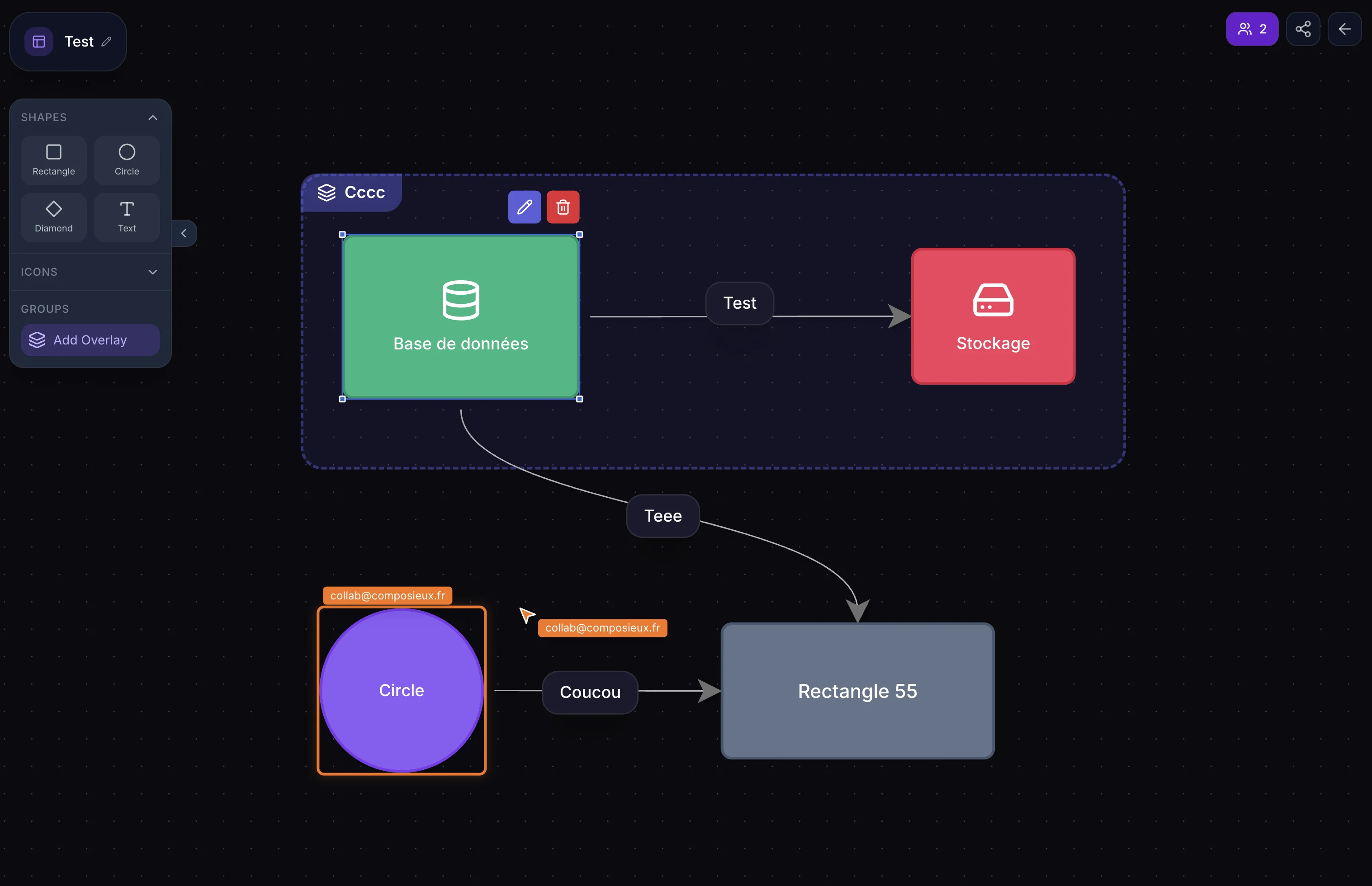
When someone selects an element, you see it highlighted with their color. A subtle glow appears around the container they're editing, with their name hovering above it. No more "wait, are you changing that?" interruptions—you just know.
Changes Appear Instantly
Every action syncs across all participants in real-time. Create a new system and it materializes on everyone's canvas. Drag a container to reposition it and everyone sees the movement. Update a description and the text changes for the whole team.
There's something deeply satisfying about watching architecture take shape collaboratively. One person sketches the high-level systems while another fills in the container details. Someone adds the external dependencies while you document the relationships. The diagram grows organically, shaped by multiple perspectives simultaneously.
We've built the sync infrastructure to handle concurrent edits gracefully. If two people happen to modify the same element at the exact same moment, the system reconciles the changes intelligently. In practice, the cursor presence makes this rare—you naturally work on different parts of the diagram.
Architecture, Not Just Drawings
Here's what makes this different from Miro or FigJam: everything you create is real architecture documentation.
That system you sketched during the brainstorm? It's now a first-class entity in your C4 model, queryable through the API, linkable to ADRs, visible in your architecture reports. The relationships you drew? They're tracked, validated, and available to the AI for analysis.
Collaboration sessions in Archyl produce durable artifacts, not screenshots of a temporary drawing that someone has to "clean up and document properly" later. The documentation is the workshop output.
How We Built It
Real-time collaboration at scale is an interesting engineering challenge. We considered WebSockets but ultimately chose a polling-based approach with one-second heartbeats. It's simpler to operate, works reliably behind corporate proxies and load balancers, and provides acceptable latency for architecture work—you're not playing a video game, you're designing systems.
Each participant sends their cursor position and currently selected elements with every heartbeat. The server tracks active sessions, assigns colors from a carefully chosen palette of ten distinct hues, and cleans up stale sessions after 30 seconds of inactivity. Operations are broadcast through an operation log that participants poll for updates, with version numbers ensuring nobody misses a change.
The frontend handles the complexity of merging server state with local optimistic updates. When you drag an element, it moves instantly under your cursor while the change propagates to others. A content-hashing system detects when the server state actually differs from local state, avoiding unnecessary re-renders and the jarring experience of elements jumping around.
Designed for Remote Architecture Work
We've thought carefully about the details that make remote collaboration feel natural.
The collaborator list sits in the bottom-left corner, showing avatars in an overlapping stack. If more than five people join, you'll see a "+N more" indicator—though in our experience, the best architecture sessions stay small and focused.
When you need to concentrate, you're not forced to see every cursor dancing around the screen. Focus mode hides the visual presence indicators while still keeping your changes synchronized. You work in peace, and when you look up, you'll see what changed.
Time zone awareness helps distributed teams coordinate. The presence indicator shows each collaborator's local time, so you know whether your colleague in Singapore is wrapping up their day or just getting started.
Getting Started
Whiteboard collaboration is available on all plans. There's no special setup—just open a project's diagram view, click the "Collaborate" button in the toolbar, and share the session link with your team.
Gather your architects, open a whiteboard, and design something together. The best architecture decisions happen when everyone can contribute, regardless of where they're sitting.
New to Archyl? Learn how our AI-Powered Architecture Discovery can automatically map your existing codebase, then invite your team to refine and evolve the architecture together.