Project Export & Import: Your Architecture, Fully Portable
We believe your architecture documentation belongs to you. Not locked in a proprietary format, not trapped behind an API, not held hostage by a subscription tier. If you've invested time documenting your systems, containers, components, and relationships, you should be able to take that work with you.
Today, we're making that belief concrete. Archyl now supports complete project export and import.
Everything in One File
When you export a project, you get a single JSON file containing your entire C4 model. Every system you've defined, every container within those systems, every component, down to code-level elements if you've modeled at that depth. The relationships connecting them, with their descriptions and technology annotations. The visual overlays you've created to group and organize your diagrams.
The export preserves the spatial layout of your diagrams. You've spent time positioning elements to communicate structure clearly—the API gateway on the left, databases on the right, external systems at the top. That arrangement isn't random; it's part of how you communicate your architecture. Export captures it all.
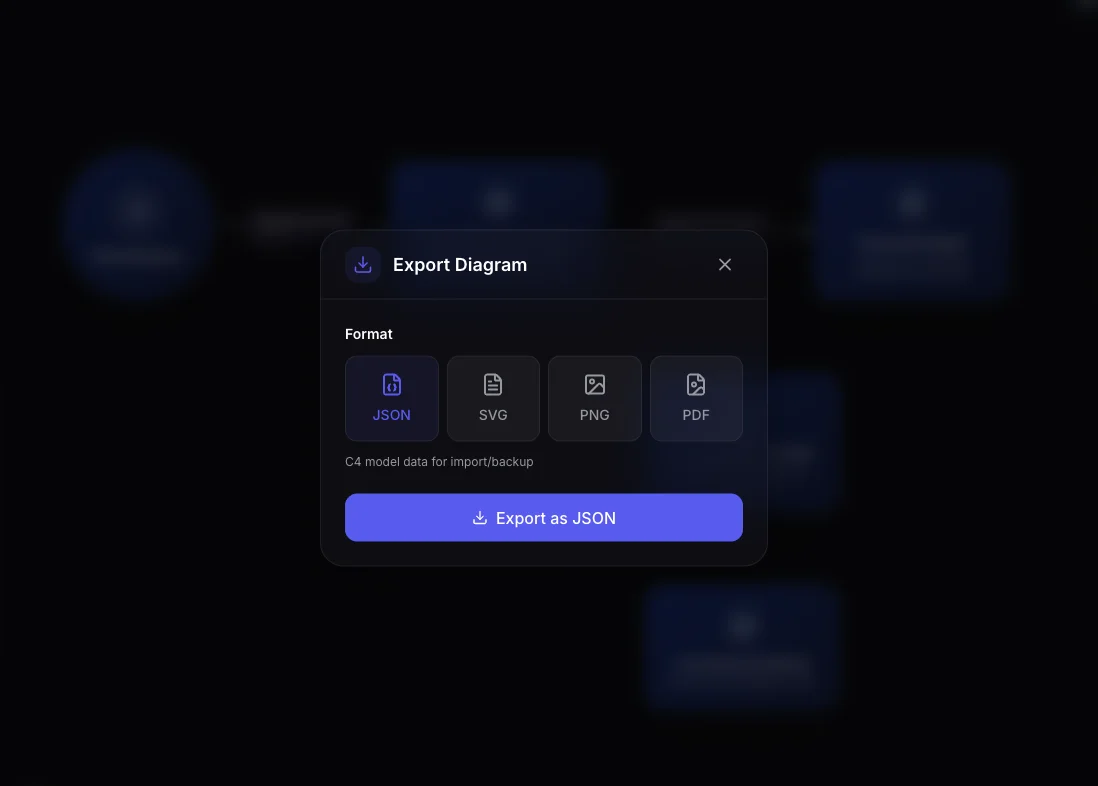
The format is straightforward JSON, versioned and documented. Open it in any text editor and you can read it. Parse it with a script if you want to do something custom. It's your data in a format you control.
How Export Works
Open any project you have access to, navigate to the export option, and choose your format. For data portability, select JSON. The file downloads immediately—even large projects with hundreds of elements export in seconds.
We also support visual exports for different use cases. SVG gives you a vector format you can edit in Illustrator or embed in documentation. PNG provides a shareable image. PDF creates a professional document. There's even an option to combine all four C4 levels into a single comprehensive export.
For automation, the API endpoint works exactly as you'd expect. A GET request to /projects/{id}/export returns the complete JSON payload. Build it into your CI pipeline, schedule weekly backups, or integrate with whatever workflow you already have.
Importing Creates Fresh Projects
When you import an architecture, Archyl creates a brand new project. You provide a name and slug, optionally select a team, and upload your JSON file. The system parses the export, validates its structure, and recreates every element with fresh identifiers.
This is a deliberate design choice. Import doesn't merge into existing projects or attempt to reconcile conflicts. It creates a clean copy, independent from the source. The original project continues unchanged; the imported project starts its own life.
The import process handles the complexity of ID remapping transparently. Your export contains the original UUIDs from when elements were created. Import generates new UUIDs for everything while preserving the relationships between elements. A container that belonged to a specific system still belongs to that system. A relationship that connected two components still connects them. The structure is identical; only the identifiers change.
If a relationship in the export references an element that doesn't exist—perhaps from a partial export or a corrupted file—the import logs a warning and continues. You'll get everything that could be imported, with visibility into what was skipped.
Real Use Cases
A consulting firm we work with uses export to deliver architecture documentation to clients. They model the client's system in Archyl, refine it through discovery and manual documentation, then export the final result. The client receives a JSON file they can import into their own Archyl instance or simply archive as a record of the engagement.
An enterprise platform team exports their architecture weekly to an internal backup system. If anything ever goes wrong with their primary documentation, they can restore from the latest export. The JSON format means the backup is readable and verifiable, not an opaque binary blob.
A startup used export during an acquisition. The acquiring company needed to understand the target's system architecture. Rather than scheduling weeks of knowledge transfer meetings, the team exported their Archyl project and shared the file. The acquirers imported it, explored it interactively, and came to the integration discussions with real understanding of what they were buying.
Development teams use export as architecture snapshots. After a major release, they export the current state and commit the JSON file alongside the code. Months later, when someone asks "what did the architecture look like before the microservices migration?", the answer is a git checkout away.
What Gets Exported
The export includes the complete C4 hierarchy. Systems at the top level, with containers nested inside, components within containers, and code elements within components. Each element carries its full metadata: name, description, type, technology stack, tags, position coordinates, and any custom styling.
Relationships are exported with both endpoints specified, along with their type, description, and visual properties like label positions. The import process maps these to the newly created elements, maintaining the exact connection structure.
Overlays—the visual groupings you create to organize complex diagrams—are included with their positions, dimensions, colors, and the elements they contain.
What's not currently exported: ADRs, project documentation, user flows, and repository connections. The export focuses on the C4 model itself—the systems, containers, components, code, and their relationships. We're considering expanding the scope in future releases based on what users tell us they need.
No Lock-In, No Tricks
The export format uses version "1.0" today. As we add features, we'll update the format while maintaining backward compatibility. An export you create today will import correctly years from now, even as Archyl evolves.
We're not interested in trapping your data. We're interested in being useful enough that you choose to stay. Export and import are our commitment to that philosophy. If Archyl stops being the right tool for you, take your architecture and go. If a competitor builds something better, we've made it easy to switch. The pressure is on us to keep earning your trust.
Getting Started
Export and import are available on all plans, including Free. There are no artificial restrictions, no "export is a premium feature" games.
To export: open any project, find the export button, select JSON, and save the file.
To import: from your project list, click Import, upload a JSON file, give your new project a name, and confirm.
Your architecture documentation is yours. Now you can take it anywhere.
Want to learn more about what you can document in Archyl? Read our Introduction to the C4 Model or see how AI-Powered Architecture Discovery can automatically map your existing systems.