Custom Insight Rules: Your Architecture, Your Standards
Architecture insights have been one of Archyl's most popular features since launch. Point the analyzer at your architecture and it identifies potential issues: single points of failure, circular dependencies, orphaned elements, missing documentation. Teams tell us it's like having a senior architect reviewing their system design continuously.
But we kept hearing the same feedback: "That warning doesn't apply to us."
Maybe your microservices intentionally share a database during a gradual migration. Perhaps a component has many incoming dependencies because it's a shared utility library—not a coupling problem, just good code reuse. Or your team has decided that eight connections to a service is fine, even though our default threshold flags it.
Generic rules can't account for your context. So we're putting you in control.
Seven Rules, Your Thresholds
Archyl now lets you customize the insight rules that analyze your architecture. We've identified seven patterns that matter for architectural health, and you can now tune each one to match your team's standards.
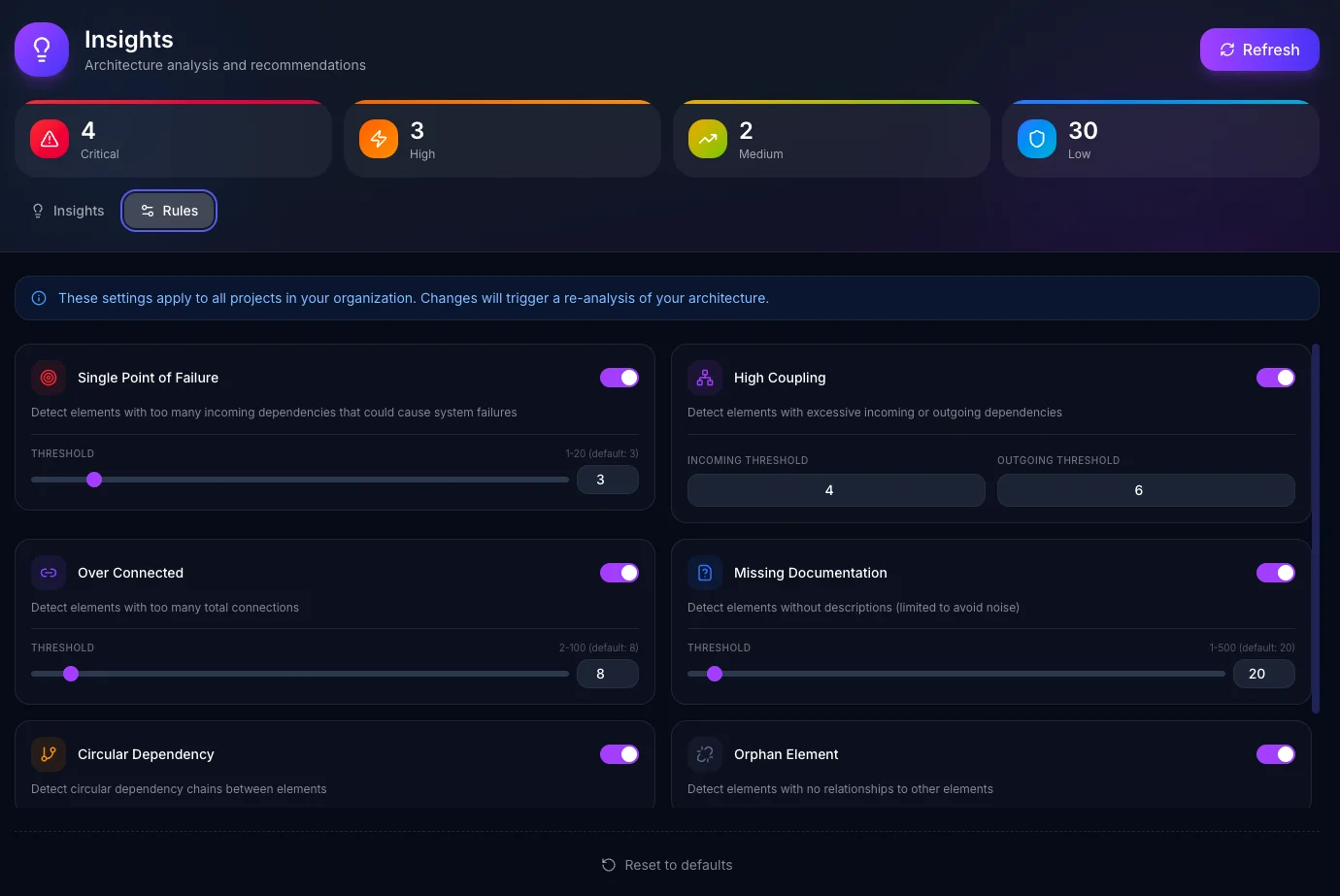
The Single Point of Failure detector finds elements that too many other components depend on. By default, we flag anything with three or more incoming dependencies, but if your architecture intentionally centralizes certain concerns, you can raise that threshold to five, ten, or whatever makes sense. Critical infrastructure like databases always get extra scrutiny—we've learned that a database becoming a SPOF is almost always worth knowing about.
High coupling analysis looks at both directions: elements that depend on too many things (outgoing) and elements that too many things depend on (incoming). The defaults—six outgoing, four incoming—work well for most codebases, but a platform team building shared libraries might want higher thresholds than a product team building focused features.
Over-connected elements catch a different problem: components that have so many total connections they're hard to reason about. Eight connections might be fine for your API gateway but concerning for a domain service. Adjust the threshold to match your architecture patterns.
Circular dependencies are almost always problematic—they make testing harder, create initialization headaches, and signal unclear boundaries. This rule is binary: on or off. If you're intentionally using circular references for some reason, turn it off. Most teams leave it enabled.
Orphan elements find architecture components with no connections at all. Sometimes that's a documentation oversight; sometimes it's a deprecated service you forgot to remove. The rule flags them so you can decide.
Security patterns detect concerning architectural choices like external systems with direct database access. These are critical-severity findings that most teams want to know about immediately.
Missing documentation helps maintain coverage, but on a codebase with thousands of components, flagging every undocumented element creates noise. You can set a threshold—only check documentation if you have fewer than 20 components, or 50, or 500. Scale the rule to your architecture size.
Organization-Wide Consistency
These settings apply across your entire organization, not per-project. We made this choice deliberately.
Architecture standards should be consistent. If your platform team decides that four incoming dependencies is the threshold for high coupling, that standard should apply everywhere. New projects automatically inherit the organization's rules. Teams can't accidentally (or intentionally) set looser standards that create technical debt.
The settings live in your organization configuration. Anyone with edit permissions can adjust them, and changes take effect immediately—Archyl re-analyzes your architecture with the new rules and updates the insights dashboard.
The Rules Tab
We've added a dedicated Rules section to the Insights page. Each rule appears as a card with a toggle switch and, where applicable, threshold inputs.
For threshold-based rules, you'll see the current value, the allowed range, and the default. Slide the threshold up to be more permissive, down to be stricter. The interface validates your inputs—you can't set impossible values or create configurations that don't make sense.
For binary rules like circular dependency detection, it's a simple on/off toggle. The card explains what the rule detects so you can make an informed choice about whether it matters for your codebase.
When you modify settings, a save button appears at the bottom of the page. Click it, and Archyl immediately re-runs the analysis with your new configuration. Within seconds, you'll see the updated insights reflecting your custom rules.
There's also a reset button that restores all defaults if you want to start fresh.
What Changes in Practice
With customizable rules, the insights dashboard becomes genuinely useful rather than a source of alert fatigue.
Teams tell us they used to glance at insights, see a wall of warnings they'd already decided to ignore, and close the tab. Now they configure the rules to match their actual standards, and when an insight appears, it's something worth investigating.
The severity levels help prioritize. Single points of failure in critical infrastructure show as Critical. Circular dependencies are High. Over-connected elements are Medium. Missing documentation is Low. You can focus on the red items first, knowing your thresholds are calibrated to your context.
And because insights update automatically when rules change, you can experiment. Curious what your architecture looks like with stricter coupling rules? Adjust the threshold, save, and see. Too noisy? Dial it back. The feedback loop is immediate.
Getting Started
Custom insight rules are available on all plans. Navigate to Insights, click the Rules tab, and start tuning.
We recommend starting with the defaults and adjusting based on what you see. If a particular rule generates warnings you consistently ignore, that's a signal to either fix the underlying architecture or adjust the threshold. Both are valid choices—the goal is to make insights actionable, not to chase arbitrary metrics.
Your architecture has its own characteristics, its own intentional trade-offs, its own definition of "good enough." Now your governance can reflect that.
Want to see how AI-powered insights work? Read about AI-Powered Architecture Discovery to understand how Archyl analyzes your codebase and generates architectural recommendations.